Start free

partner program

WPManager × DaoFile

File hosts that don’t lie. No shaving — only honest partners.

The WPManager panel is free for DaoFile webmasters. Upload your files, publish posts with DaoFile links and bring back the links that die, all from one panel.

Already on DaoFile? Open WPManager from your DaoFile cabinet — your account is created automatically.

  • Basic free while you work with DaoFile
  • Professional free at $1000+ in 30 days
  • Adult sites welcome

what you get

What you get, for free

Partner webmasters use the panel without a subscription fee, and adult sites are welcome.

Basic plan, free

Basic costs nothing for as long as you work with DaoFile.

Professional, free at $1000+

Earn $1000 or more on DaoFile in the last 30 days and the panel moves you to Professional (50 sites) at no cost. The panel checks it every day.

A free XSOnlyTube license

Pick the XSOnlyTube WordPress theme or the XSOnlyTube engine. It is renewed every month while you earn anything on DaoFile, and the first 3 months are renewed even with no earnings. At $1000+ in 30 days it becomes a yearly license, also renewed free.

how it works

From your cabinet to first earnings in four steps

  1. Open WPManager

    From your DaoFile cabinet, with your own link: your account is created on the first visit. Coming from this page instead? Press Start free.

  2. Register on DaoFile

    Coming from this page? Register on DaoFile through the link the panel gives you, or sign in if you already have an account.

  3. Connect DaoFile

    Automatic when you come from your cabinet. Otherwise, paste your DaoFile API key under File hosts.

  4. Publish and earn

    The panel checks your 30-day DaoFile earnings every day and moves you to Professional automatically at $1000+.

features

What the panel does with DaoFile

Concrete tools for the DaoFile part of your work. The rest of the panel, your sites, backups, security and analytics, works next to them.

Upload to DaoFile

Send files to DaoFile from your PC, from your cloud storage, by URL or as a torrent.

Posts with DaoFile links

Publish posts with DaoFile links to your WordPress sites: AI writing, a Conveyor of steps and schedules.

Find every DaoFile link

Scan all your sites for DaoFile links and see which of the files behind them are gone.

Restore and relink

Put dead files back from your backups and replace the links on all your sites in one run. Keep copies of your files in storage.

Earnings and balance

See your DaoFile earnings and balance in the panel.

Uptime, backups and security

Every site watched for uptime, backed up, and protected with updates, a malware scan and a firewall.

real screens

How it looks

Real screens of the panel with demo data. Click a screenshot to zoom in, or open the guide page under it.
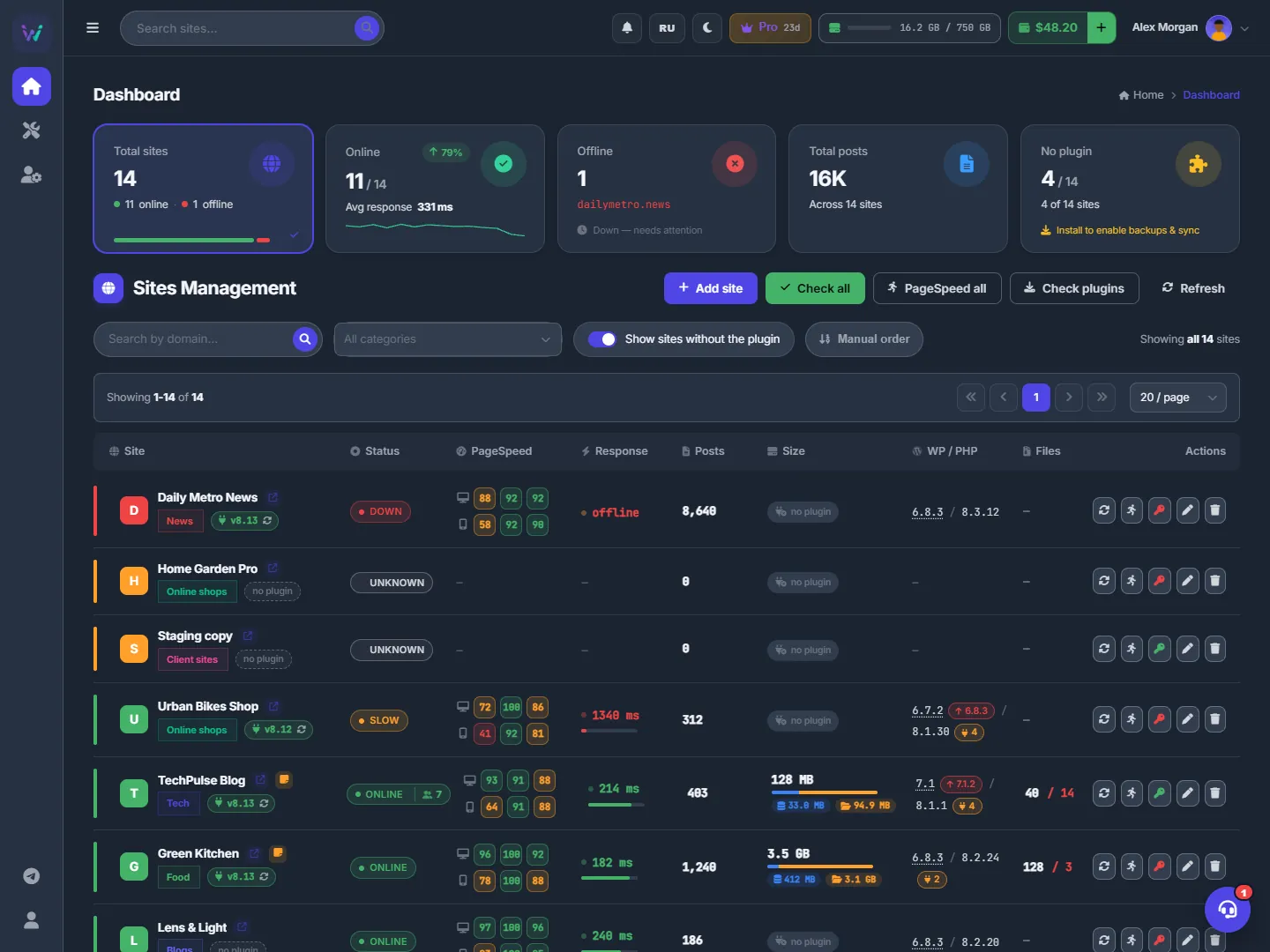
The Dashboard: totals on top, then every site with its status, PageSpeed, response time, posts and WordPress versions
Every site on one screen
The Dashboard: all your sites on one screen
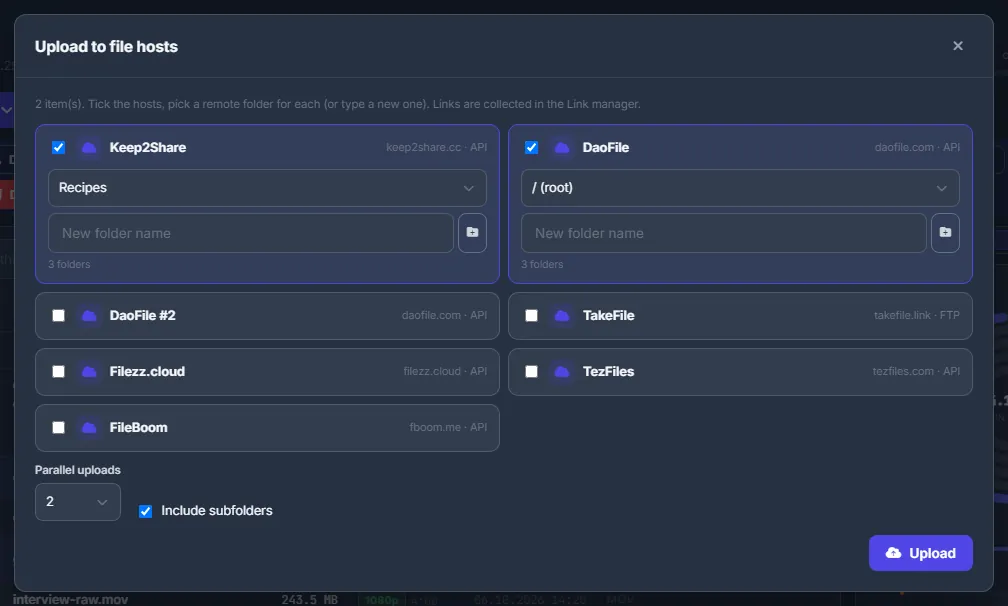
Upload to file hosts: tick several hosts, pick a folder for each one and start; the links are collected in the Link manager
One batch, several file hosts
Uploading to file hosts
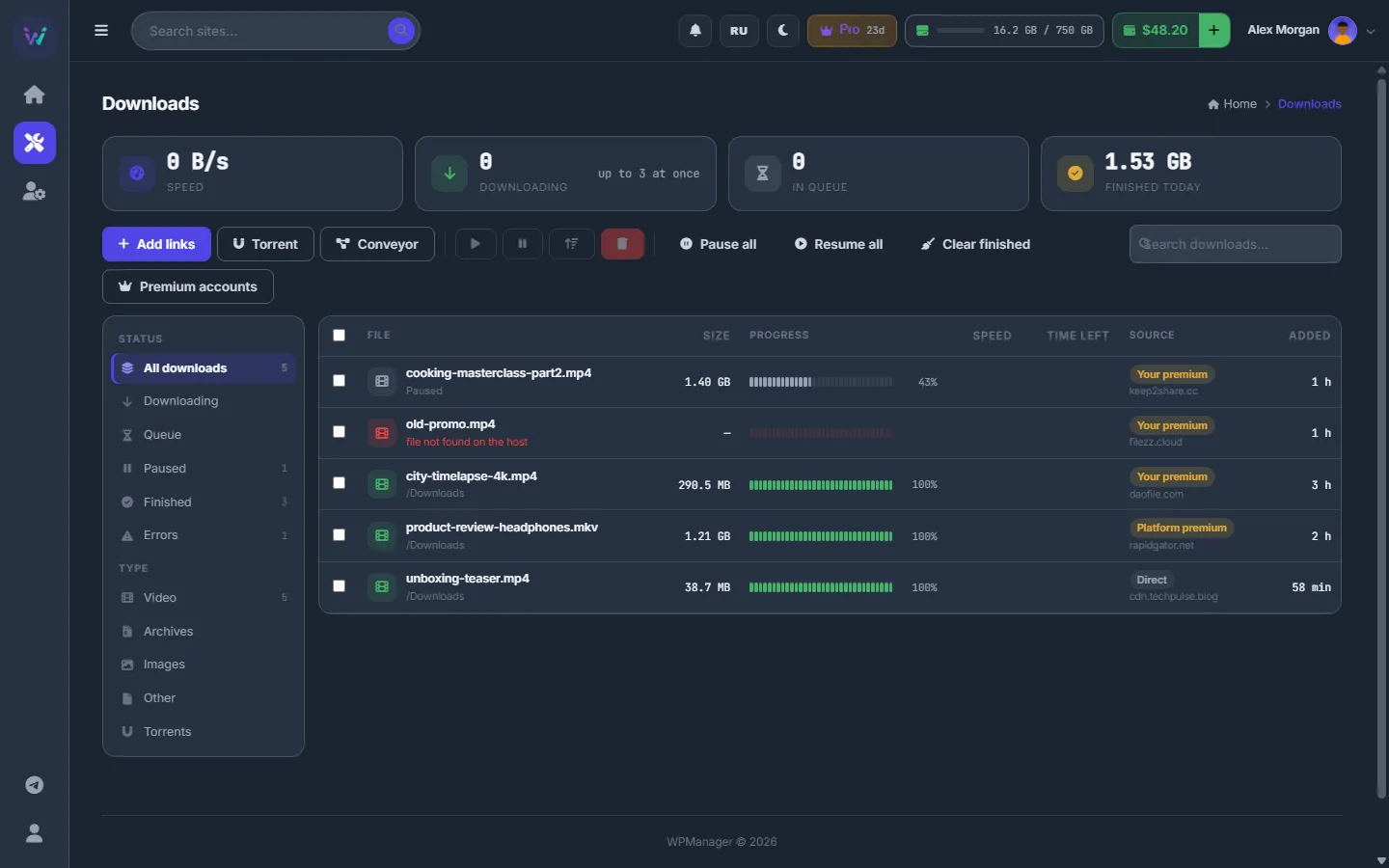
The Downloads list: Add links, Torrent and Conveyor buttons, premium accounts, filters by status and type, and the progress of each file
Downloads, torrents and premium in one list
Downloads: links, file hosts and the queue
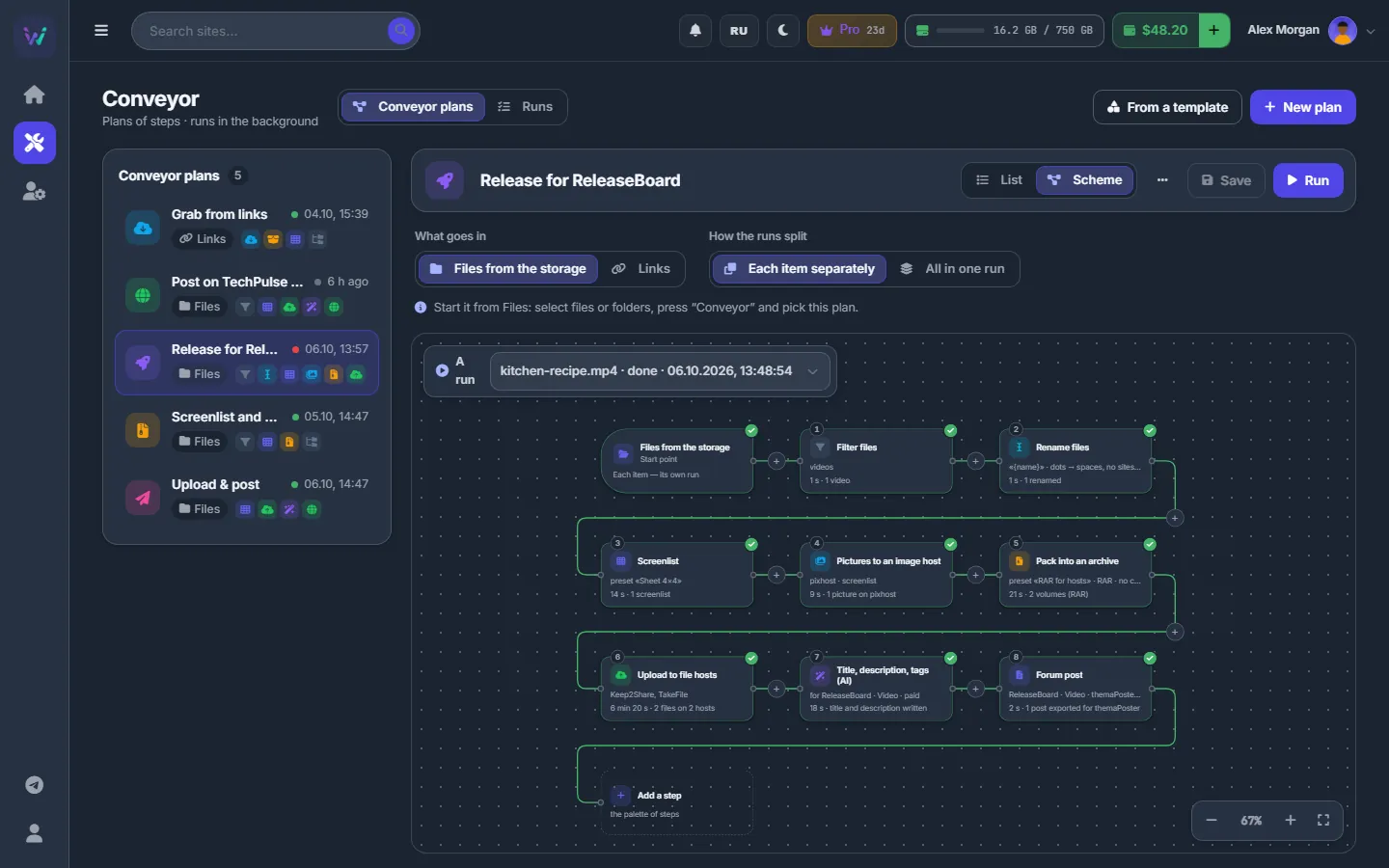
The Conveyor plan as a scheme: a node for each step, coloured by the last run, with counts and times
A Conveyor plan as a scheme
Conveyor: build a plan
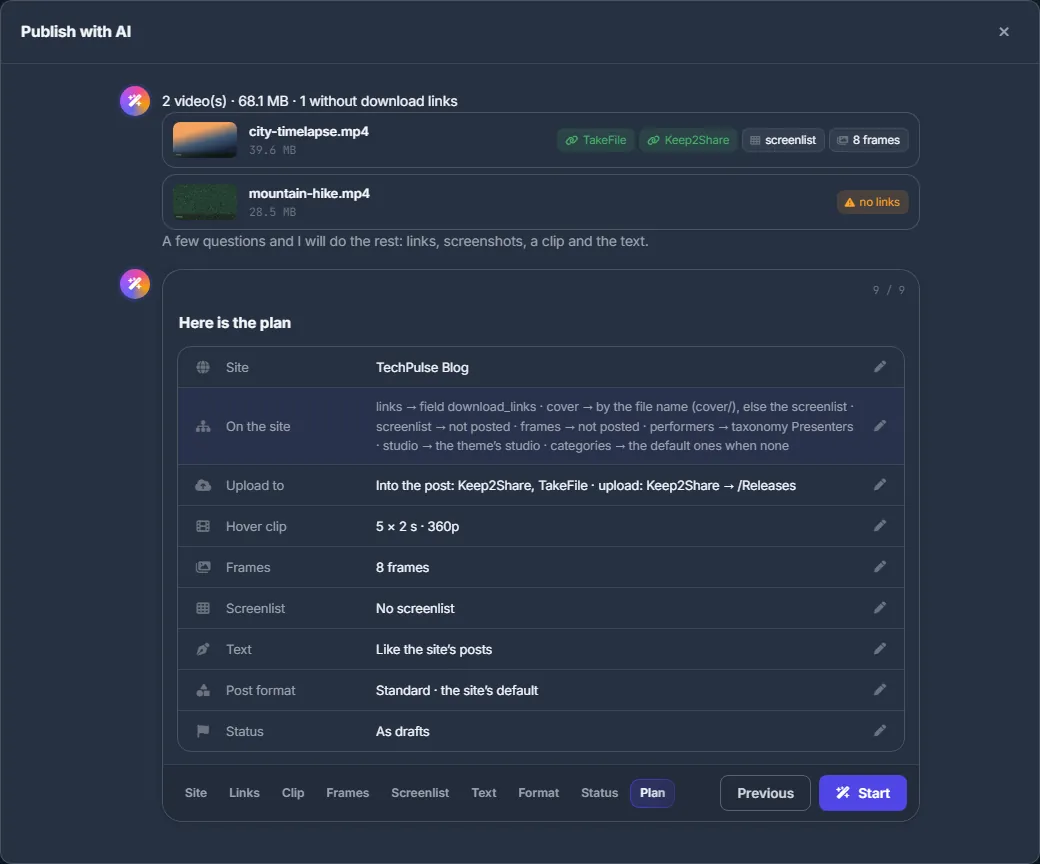
Publish with AI: the videos found, and the plan table with the site, links, clip, frames, screenlist, text and status
Publish with AI: the plan before the start
Publish with AI
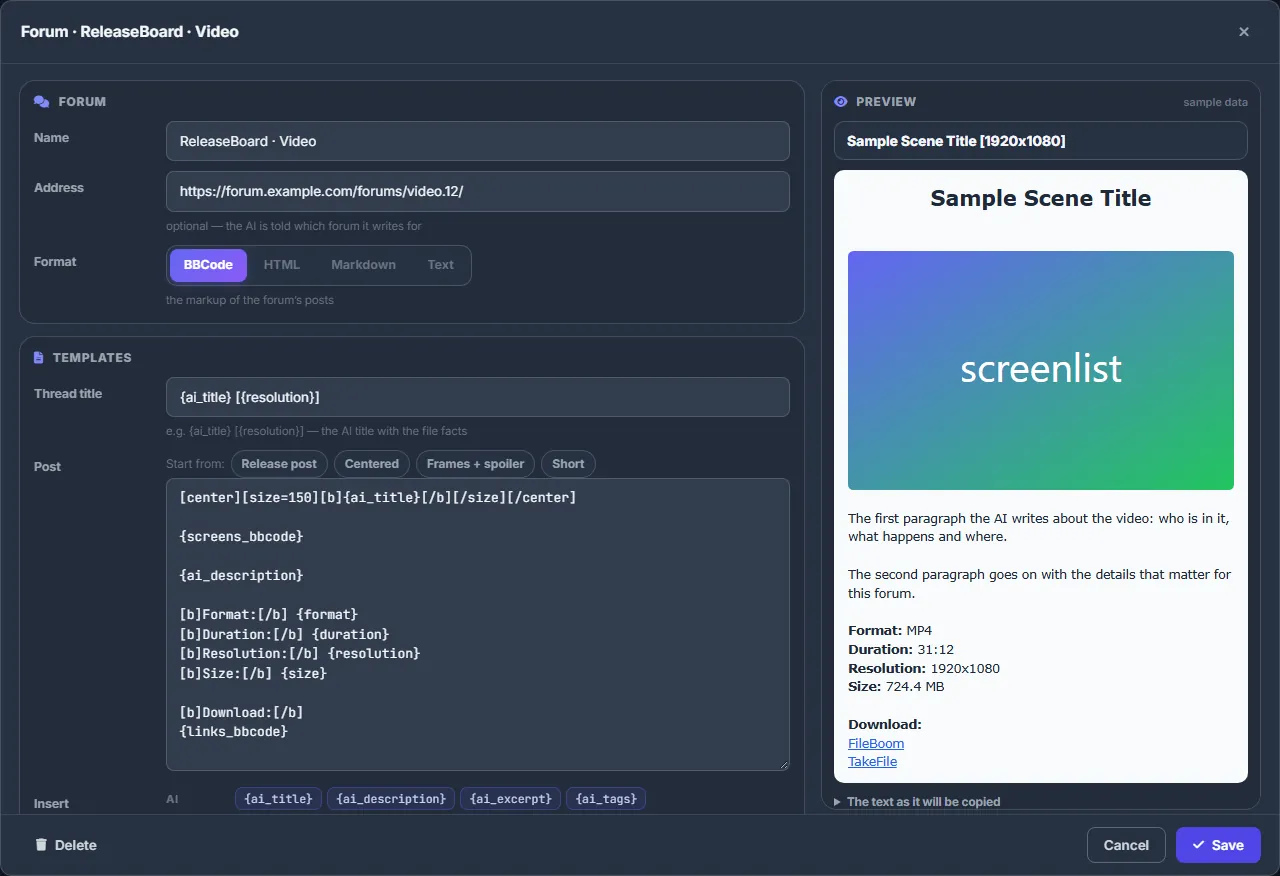
Forum editor: a BBCode template for the forum with a live preview of the post
A post template for every forum
Forum posts and themaPoster export
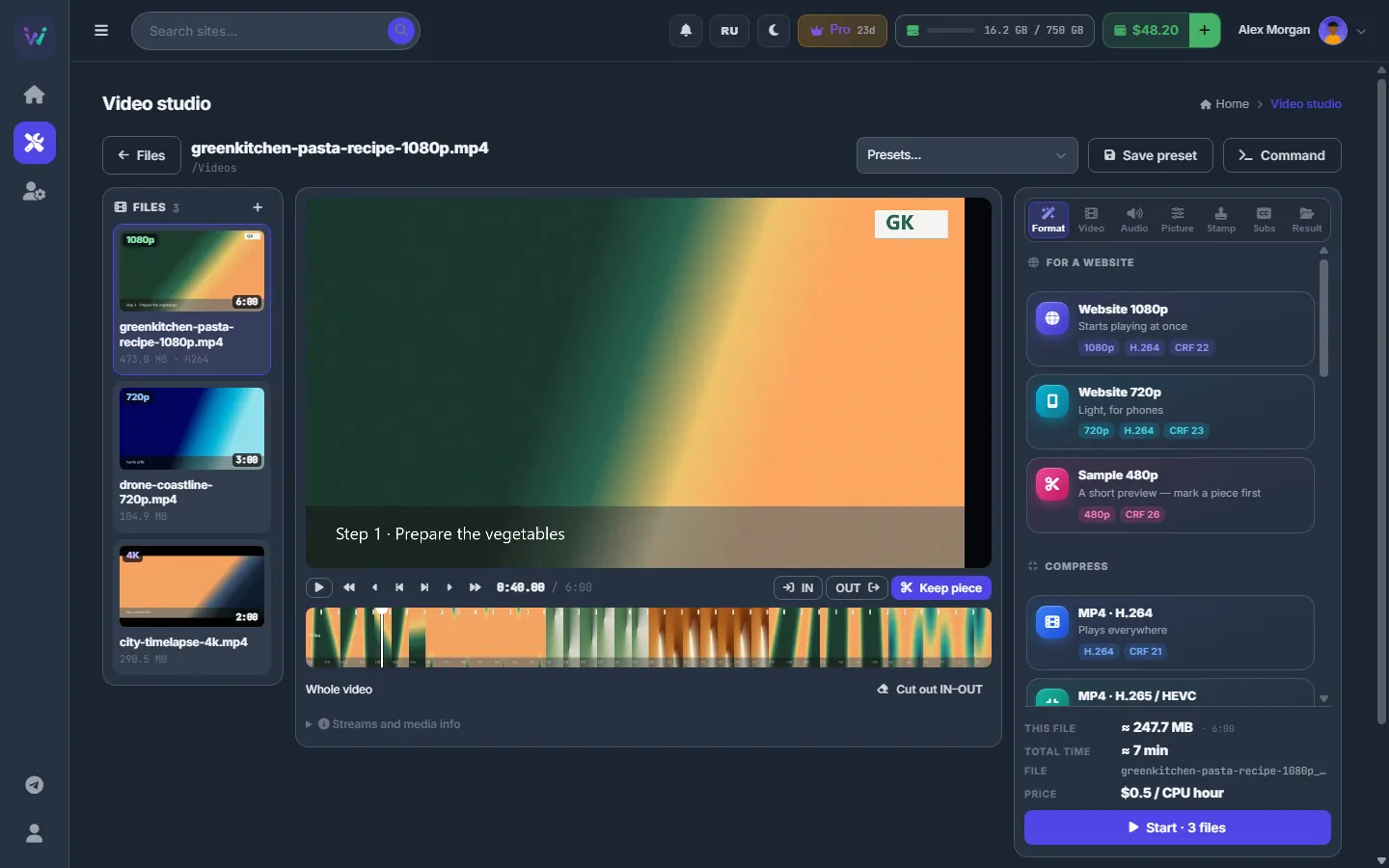
The video studio: the files list, the player with the timeline, and the format presets on the right
Video studio: presets, cut and batch start
Video studio: cutting, clips and batch conversion
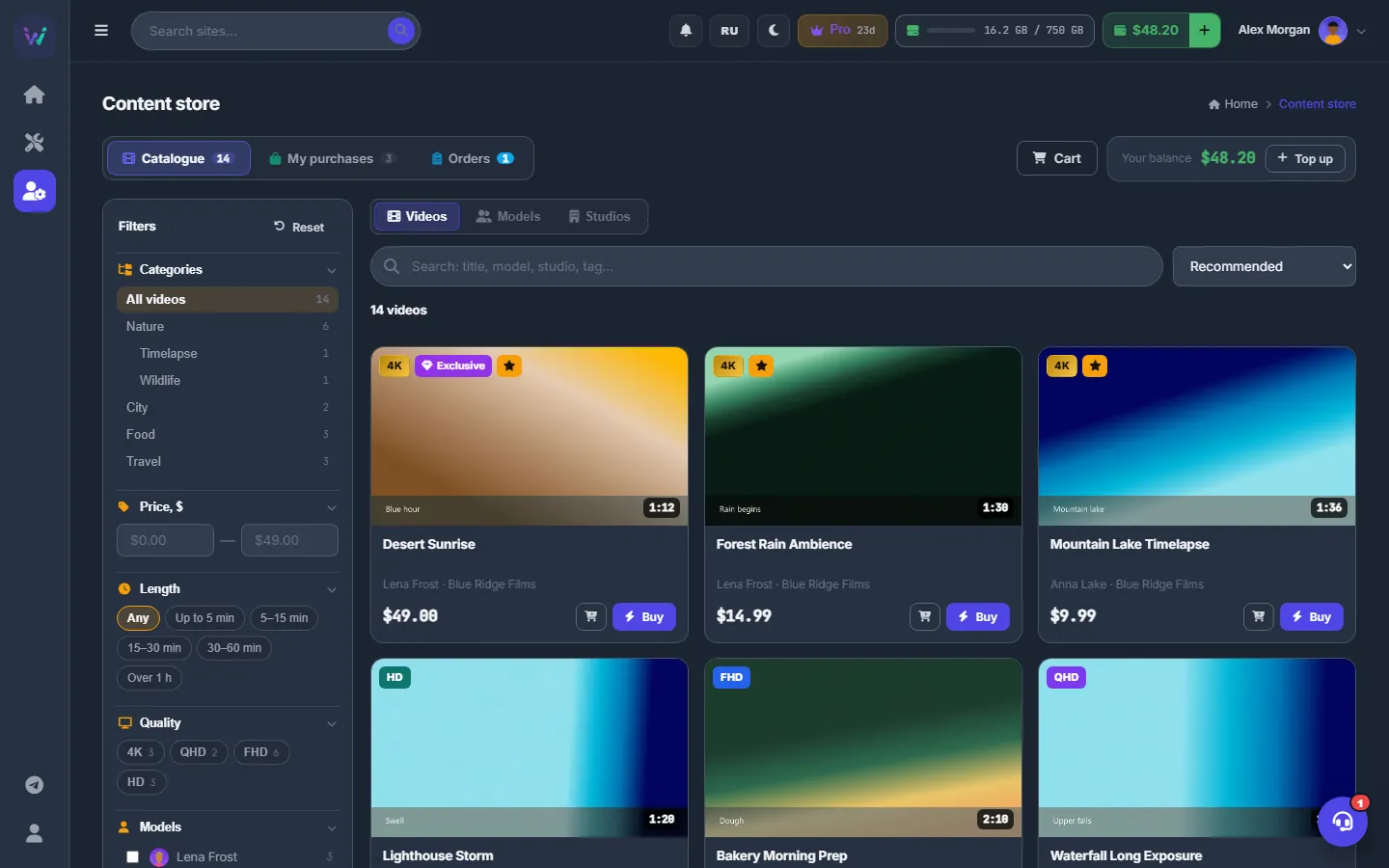
The content store catalogue: filters on the left, videos with prices, and Buy and cart buttons
The content store catalogue
Content store: the catalogue
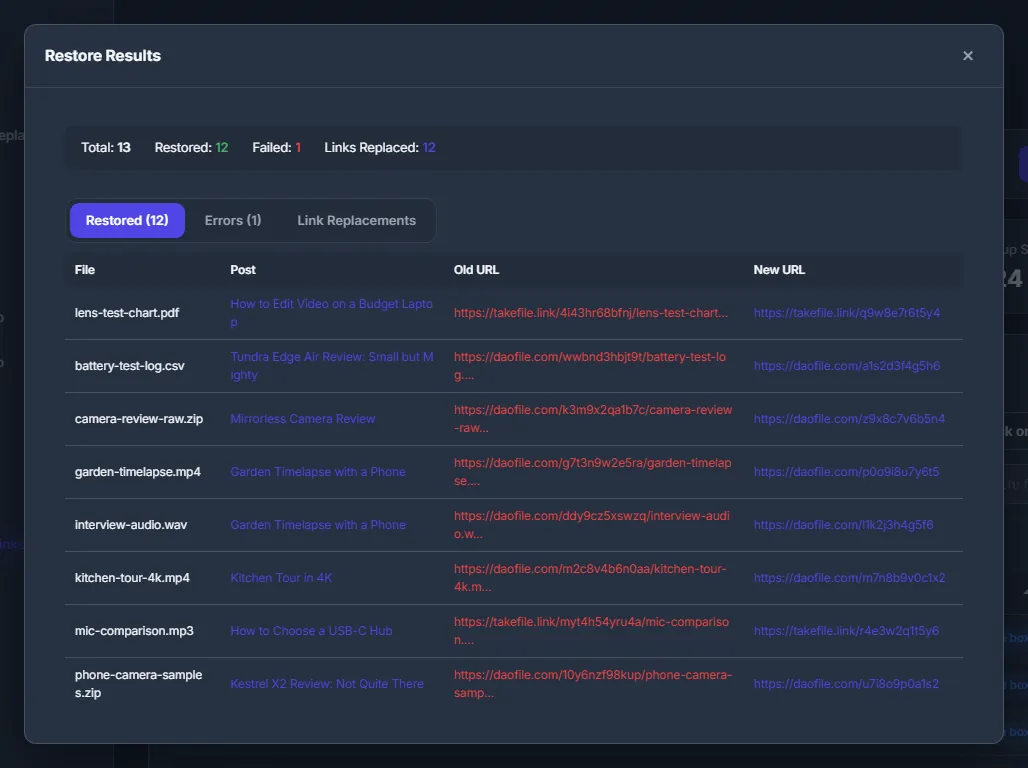
Find Dead Links, restore results: totals, restored and failed files, and the old and new file-host URLs
Dead links restored, old and new URLs side by side
Find Dead Links and restore the files
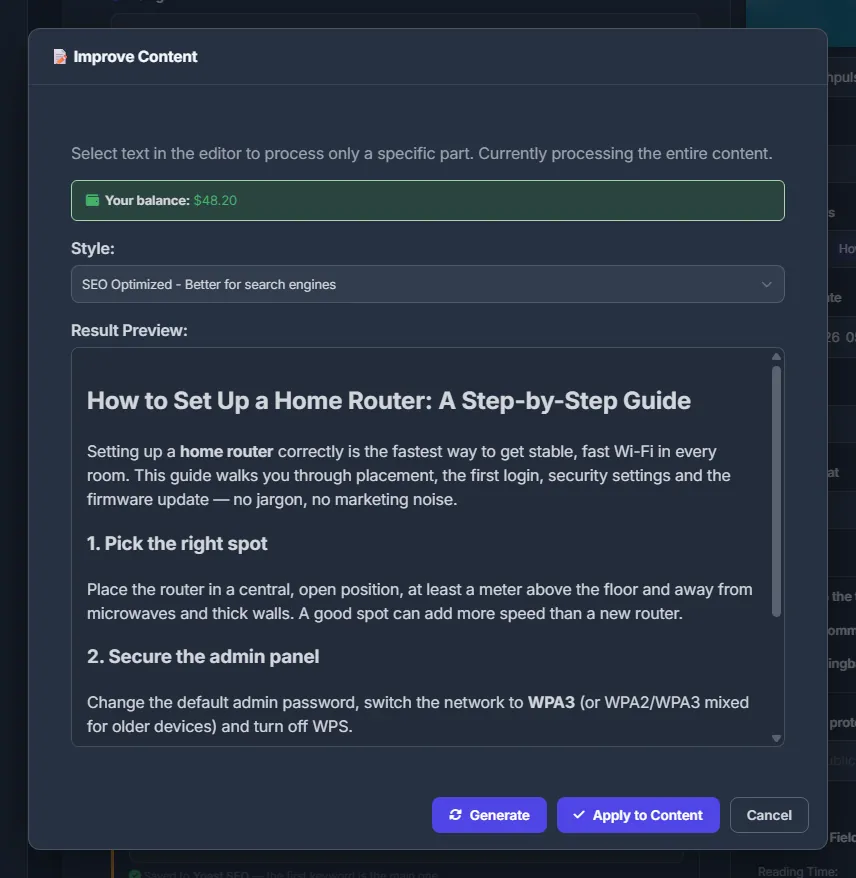
The AI improve dialog: the balance, the style and the result preview, before anything is applied to the post
AI rewrites a post, and you see the result first
AI tools for posts

the full list

Every feature, in one panel

Torrents, file hosts, storage, stores, hosting, video and photo studios, forums, AI and analytics. Each feature opens its guide page. 92 features in one account.

Files and storage

  • Your storageBrowse folders, preview videos and pictures, select files and see what takes the space.
  • UploadsUpload files and folders from your PC. Big files go in 64 MB pieces and resume after a dropped connection.
  • Folders and bulk renameCreate folders, move and copy files, rename hundreds by rules with a live preview, and download as zip.
  • Archives, images, checksumsPack into ZIP, 7z or RAR for file hosts, convert pictures to WebP or AVIF, compute checksums, change MD5.
  • Access from a PCOpen the storage over SFTP, FTP or WebDAV and connect FileZilla, WinSCP or a network drive.
  • Your FTP and SFTP serversConnect your own FTP, FTPS or SFTP servers and copy whole folders both ways as background tasks.
  • Storage tasksArchives, conversions, screenshots and uploads on the server: progress, queue limits and how to stop one.

Downloads and tasks

  • Server downloadsDownload from file hosts, direct links and magnets into your storage, several at a time, with retries.
  • TorrentsAdd magnets or .torrent files, choose the files you need, and follow peers and ratio, all on the server.
  • Premium downloadsAdd your premium logins for full speed, or use shared WPManager premium and pay per GB from the balance.
  • Every background jobArchives, conversions, downloads and uploads on one page, with progress, speed and time left.

File-host accounts and uploads

  • File-host accountsConnect your file-host account: the panel knows its links, checks the files and uploads to it.
  • Hosts without an APIA host with no API works with a login and password, plus a session cookie when a captcha appears.
  • Balances and statisticsBalances of every account, 7-day download stats, balance history up to 90 days and Telegram alerts on changes.
  • Link CheckerCheck up to 500 file-host links at once: status, file name and size of each file, with CSV export.
  • Upload to file hostsSend one batch to several hosts at once, into the folders you pick. The server uploads in the background.
  • Link managerAll upload links in one place, grouped by batch, ready to copy as URL, BBCode, HTML, Markdown or a post.
  • Image hostsConnect pixhost, pimpandhost or PicState and upload screenlists and photos in one click, with forum code.

Links on your sites

  • Link scannerSync the posts of your WordPress sites, find every file-host link and check which files are dead.
  • Find dead links and restoreList a site's dead links, see which files have backups, and restore them: upload and relink the posts.
  • Transfer between hostsThe panel fetches each file, uploads it to your account on another host and swaps the links on your sites.
  • Transfer runs and historyFollow each run file by file, pause, resume or retry, export old-to-new links and search the history.
  • Replace linksReplace file links in many sites' posts at once, by file name or by exact old-to-new pairs, with a CSV report.

Conveyor and AI publishing

  • Build a plan onceDownload, unpack, screenlist, archive, upload, AI text, publish: build the plan once and run it on any files.
  • Every Conveyor stepDownloads, torrents, unpack, rename, screenlist, video studio, archives, uploads, AI text, posts, publishing.
  • Start and follow runsStart a plan from Files, Downloads or the Conveyor page; follow the steps, cancel, or retry a failed step.
  • Publish with AITurn videos into WordPress posts: answer a few questions, check the AI text, then create them with links.
  • Where things go on the siteSet once where the cover, links, screenlist, frames, performers, tags and your own fields go in each post.

Posts, forums and AI

  • Forum posts and themaPosterA template for each forum, posts for many files with links, exported as .txt or zip for themaPoster.
  • Your posts listFind, filter, open, edit or delete any WordPress post of a site from the panel, with quick filters.
  • Post editorTitle, slug, content, excerpt, tags, categories, cover, status, date and SEO focus keywords in one editor.
  • AI tools for postsRewrite text, write excerpts, describe images, suggest tags and focus keywords scored by real search data.
  • Duplicate postsFind posts with identical titles, keep the oldest of each group and send the copies to the WordPress Trash.
  • AI assistantChat with the WPManager Agent: it knows your sites, traffic and payments, and waits for your Confirm.
  • Appearance and AI settingsDark and light mode, the AI models in use, your balance, and where you choose a model yourself.

Video and photo

  • Video studioCut clips, make samples, GIFs and parts for file hosts, and convert whole folders with one preset.
  • Video studio settingsCodec and quality, size, crop and blur drawn on the picture, watermark, sound, subtitles and output.
  • Screenlists and framesScreenlists or separate frames for any number of videos: layout, info header, your watermark, presets.
  • Photo studio: framesPick frames from a video on a canvas, fine-tune each to a single frame and save them in full quality.
  • Photo studio: collagesJoin frames, screenshots or photos into one picture in a row, a column or a grid, with gaps and a background.

Sites

  • The DashboardEvery site on one screen: live status, response time, PageSpeed, posts, size, WordPress and PHP versions.
  • Adding sitesAdd a site with its name, address, category and plugin key, and the panel sets it up itself.
  • The WordPress pluginInstall the free WPManager plugin, paste its key into the panel, and fix Cloudflare or firewall blocks.
  • CategoriesGroup sites by client, niche or project with coloured categories, then filter the Dashboard by them.
  • The site pageQuick actions and every tab on one page. The Overview shows key numbers, SEO metrics, storage and cache.
  • Site settingsName and address, the plugin connection, the AI output language and prompts, SEO data and publishing.
  • Site notesFormatted notes for every site: hosting, clients, quirks. They save themselves and show on the Dashboard.
  • Visitors onlineSee how many visitors each site has right now, straight from the Dashboard, and where to find the Globe.

WordPress from the panel

  • PluginsActivate, update, delete and install plugins from WordPress.org or a ZIP, one or many, without wp-admin.
  • ThemesSwitch the active theme, download a theme as ZIP, delete unused ones, install new ones from WordPress.org.
  • Users, comments and mediaAdd and edit users, moderate comments, clear out spam and browse or delete media files from the WordPress tab.
  • UpdatesSee pending WordPress, plugin and theme updates on the Dashboard and apply them per site, one or all.

Security and backups

  • Security score and scanA security score with reasons, a nightly malware scan with evidence, quarantine, bad bots and scan history.
  • Firewall and allowlistBlock IPs, ranges and countries, keep an allowlist and switch on one-click Cloudflare rules.
  • Connect CloudflareConnect a zone with a scoped API token: exact permissions, zone and IP limits, a permission check, disconnect.
  • The Cloudflare tabPurge the cache, switch Dev Mode or Under Attack, read DNS records and change zone settings from the panel.
  • Site backupsBack up the database, media, plugins and themes in one click, keep copies off-site and restore them.
  • File backupsCopy the files behind your file-host links to your FTP or local storage, and read the report of each run.
  • Uptime monitoringChecks every minute with a keyword check, 90 days of history, SSL and domain warnings and Telegram alerts.
  • Public status pageOne public link: whether the chosen sites are up, their uptime for 24 hours to 90 days, recent incidents.

Traffic analytics

  • Your site's trafficAnalytics without Google Analytics: visitors, pageviews, bounce rate, sources, pages, devices, countries.
  • Sessions and eventsWatch each visit live with its source, pages and duration, follow the event feed and send your own events.
  • GlobeLocated visits on a 3D globe or a flat map, replayed on a timeline, plus Cloudflare visitor location.
  • Journeys, goals and funnelsSee visitor paths, count conversions for page and event goals, and find where a funnel loses visitors.
  • RetentionCohorts of new visitors by day or week, return rates, the retention curve and new versus returning visitors.
  • Google Analytics 4Connect a GA4 property: users, sessions, views, sources, devices, top pages and countries on the site page.

Speed and SEO

  • PageSpeedGoogle PageSpeed for mobile and desktop: scores, metrics and a fix list, which you can hand to the AI agent.
  • Site auditA quick check of the home page: SEO tags, security headers, WordPress exposure, speed and broken links.
  • Google Search ConsoleConnect read-only: clicks, impressions, CTR, positions, top queries, sitemaps and the position of each post.
  • Position reportCompare two Search Console periods page by page: movers, CTR chances, and AI SEO advice for any page.
  • Bing Webmaster ToolsConnect with a free API key: clicks, queries, pages, crawl health, URL submission and keyword data.
  • Keyword data and scoresWhere keyword facts come from (Search Console, Bing, DataForSEO), how to set the market, how scores work.

Stores

  • The StoreWordPress themes, site engines and plugins from your USD balance. The team installs them for you.
  • Store orders and invoicesFollow orders from payment to installation, and pay the team's invoices for extra work, such as a migration.
  • Content store catalogueSearch and filter videos, models and studios; see previews, trailers, screenshots and technical details.
  • Buying videosBuy one video in two clicks, or several at once with the cart and a promo code, paid from the USD balance.
  • My purchasesDownload in the browser, take a 24-hour link for a download manager, or send a video to Files or the Conveyor.
  • Order videos by linksSend links to videos not in the catalogue: the team fetches them, sets one price, you check samples first.

Hosting and access

Account, plans and alerts

  • Plans and pricingSite and storage limits for each plan, prices for a month or a year, purchase from the balance and auto-renew.
  • Balance and top-upTop up in USDT on TRC20, credited in about a minute, or with 300+ coins through NOWPayments.
  • What you pay forWhat the plan covers and what the balance pays for as you use it: AI, storage, traffic, premium, video.
  • Profile and financeBalance, spending charts, top-ups, the full transactions log, personal data, password and notifications.
  • Telegram alertsConnect the WPManager bot in two clicks: site down, SSL and domain expiry, payments, support replies.
  • Finance plannerRecurring bills for servers, domains, premiums, ads and taxes, with Telegram reminders before each due date.
  • Referral programGet 10% of everything your referrals spend. It is credited to your USD balance every hour, for life.
  • Support chatAsk the WPManager team from the chat button on any page; the replies also arrive in Telegram.

terms

DaoFile affiliate terms

The terms DaoFile publishes for its affiliates and premium plans. Each row links to the page it comes from.

TermAs publishedSource
Premium sales and rebills60% of premium sales and rebillsdaofile.com/pages/aff.html
Sales from your site15% of sales from your sitedaofile.com/pages/aff.html
Webmaster referral5%daofile.com/pages/aff.html
PayoutsDailydaofile.com/pages/aff.html
Premium plans$19.95 / 30 days · $39.95 / 90 days · $89.95 / 365 days · $129.95 / 999 daysdaofile.com/buy-premium.html
Premium speedUp to 100 Mb/s and 50 GB per 3 daysdaofile.com/faq.html

As published by DaoFile, October 2026.

faq

Questions, answered

Is it really free?

Yes. Basic is free while you work with DaoFile. Professional is free once you earn $1000 or more on DaoFile in 30 days. The XSOnlyTube license is free too.

What counts as $1000?

Your DaoFile earnings over the last 30 days, as the panel records them. The panel checks it every day, so the move to Professional happens on its own.

What if my earnings drop?

If your 30-day earnings stay below $1000 for 30 days, the panel moves you back to Basic. Reach $1000 again and Professional comes back automatically.

Can I use other file hosts?

Yes. The panel shows the partner host you registered with, and the other file hosts in the panel keep working. To add another host to the partner program, ask support.

What happens to the license?

You choose the XSOnlyTube WordPress theme or the XSOnlyTube engine. It is renewed every month while you earn anything on DaoFile, and the first 3 months are renewed even with no earnings. At $1000+ in 30 days it becomes a yearly license, also renewed free.

Do I need a DaoFile account already?

No. Open WPManager from your DaoFile cabinet and your account is created from your DaoFile data. Without a DaoFile account, register through the link the panel gives you.

Open the panel, for free.

Open WPManager from your DaoFile cabinet, or start here. The account is created on your first visit, and Basic is free while you work with DaoFile.

DaoFile cabinet → WPManager → publish → earn

Start free

Already on DaoFile? Open WPManager from your DaoFile cabinet.