
Frequently asked questions
Answers to the general questions about WPManager: data security, payments and the balance, what happens at $0, cancelling a plan, supported WordPress and PHP versions, limits and support.
Account and security
How do I get an account?
Click “Get started” on wpmanager.online and sign up with your email (confirmed by a link) or with Google. It is free.
A referral link (/r/<code>) leads to the same sign-up and links your account to the person who invited you. See Create an account.
Is my data safe?
- Your password is stored only as a hash, and changing it signs out every other session of your account.
- Each account sees only its own sites, files and purchases.
- The WordPress plugin answers only requests that carry your site’s API key, which you can regenerate at any time.
- Payments are made in crypto, so the panel never handles card details.
- Bought videos are served through signed links that expire.
Can the support team see my account?
To help you, support can open your panel in a read-only view. In that mode nothing can be changed and nothing can be charged.
Which WordPress and PHP versions are supported?
The WPManager API plugin needs WordPress 5.6 or newer and PHP 7.4 or newer. The panel itself runs in any modern browser. See Installing and connecting the WPManager plugin.
Payments and the balance
How do I pay?
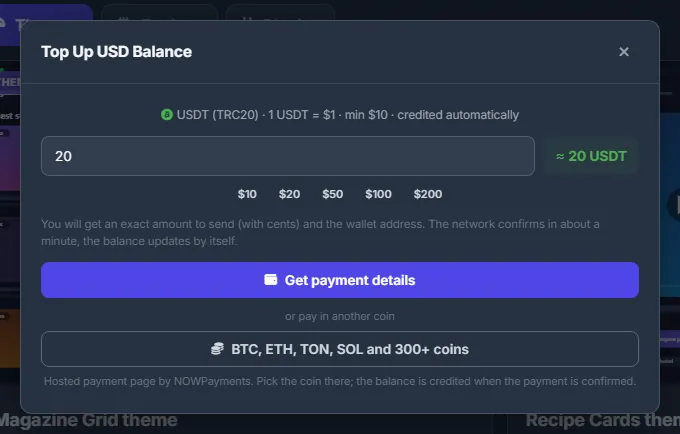
Everything is paid from your USD balance. Top it up with the “+” next to the balance in the top bar, or with any “Top up” button:
- USDT on the TRC20 network, at 1 USDT = $1;
- BTC, ETH, TON, SOL and 300+ other coins through NOWPayments, when the top-up window offers it.
The balance is credited automatically once the network confirms the payment. The minimum top-up is $10. See USD balance and top-up.
What happens when my balance reaches $0?
Everything your current plan already covers keeps working until the plan’s end date. Pay-as-you-go features stop until you top up:
- AI features — they answer “Insufficient balance — top up on the Profile page to use AI features.”;
- downloads through WPManager’s shared premium;
- the video converter and torrents;
- Store, invoice and Content store payments, and plan purchases.
If auto-renewal cannot be paid when the plan ends, the account is paused until you choose a plan — see What happens when a plan ends? below and What you pay for.
Can my balance go below zero?
Slightly, yes. Usage charged after the fact — an AI answer already generated, the daily traffic and torrent charges — can leave the balance a little negative, but never below −$5. At that limit the paid tools stop and torrents are paused until you top up. The next top-up covers the negative amount first.
Can I withdraw my balance or delete my account?
The panel has no self-service for either — write in the support chat. The balance of a deleted account is lost, so spend it or settle it with the team first.
Do Store and Content store purchases count for the referral program?
Not by default: Store products, invoices and Content store videos are excluded from referral shares. Everything else your referrals pay from their balance counts. See Referral program.
Plans
How do I cancel my plan?
On Account → Plans & Pricing switch off “Auto-renew from balance”. The panel confirms “Auto-renew off — the plan ends on its expiry date”: you keep the plan until then, and nothing more is charged for it. See Plans & Pricing.

What happens when a plan ends?
With auto-renewal on and enough balance, the plan renews by itself. Three days before the end you get a Telegram warning if the balance will not cover the renewal.
Otherwise — and when the 30-day free trial ends without a plan — the account is put on hold: its sites stop (no monitoring or scans) and the panel opens only the Dashboard, Plans, Profile and support. Nothing is deleted. With auto-renewal on, a top-up renews the plan within a day; after the trial a top-up alone is not enough — buy Basic or a bigger plan on the Plans page and everything comes back at once.
What limits are there?
Your plan sets the main ones: the number of active sites, the storage quota, the monthly traffic, the features, the AI bonus and the included premium GB and conversion minutes — compare them on Plans & Pricing.
Usage beyond that is paid from the balance at WPManager’s prices: extra storage $10 per TB a month and extra sites $5 each a month (add-ons on the Plans page), traffic over the allowance $2 per TB, AI per request with the price shown on each answer, torrents $1 per TB downloaded and $0.50 per TB seeded, premium downloads through the shared accounts per GB, conversion $0.50 per CPU hour. Some tools have their own safety limits, which their guide pages describe. See What you pay for.
Working with the panel
Do I need to keep the panel open while something runs?
No. Downloads, tasks, conveyor runs, copies and scans run on the server. You can close the browser and check the Tasks page or the Conveyor later.
How do I get help?
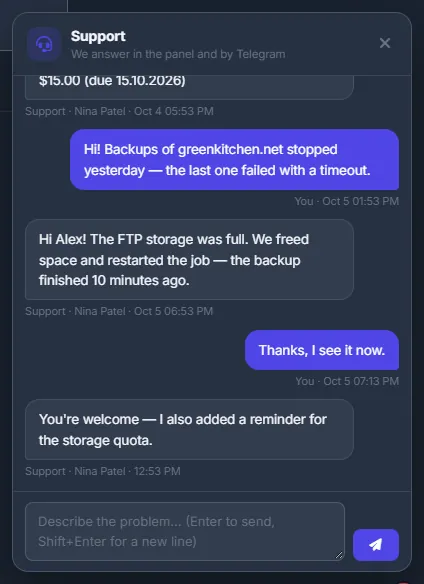
Click the headset button at the bottom right of any page and describe the problem (Enter sends, Shift+Enter starts a new line). The team answers in the panel; with Telegram alerts connected you also get a Telegram message when they reply. Mention the panel version from the top of the sidebar. See Support chat.
Which languages does the panel speak?
English and Russian. Switch with the language button (RU / EN) in the top bar — see Getting around: menu, language and theme.