
Balances, statistics and Telegram alerts
See the earnings balance of every file-host account right on its card, open the account details and download statistics, follow the balance over time and get a Telegram message when it changes.
On this page
Where to find it: Links & files → File Hosters → tab “File Hosters”.
Before you start
- The account has its API key — or, for WayShare and FlorenFile, its login and password — saved. See File host accounts.
- For alerts: Telegram connected on Account → Telegram alerts. See Telegram alerts.
The balance on the card
Each card shows the current balance in dollars:
- green — above $10;
- yellow — above $0;
- red — $0 or below;
- “⚠” — the host answered with an error. Hover the sign to read it.
A PRO badge with a crown appears when premium is active on the account.
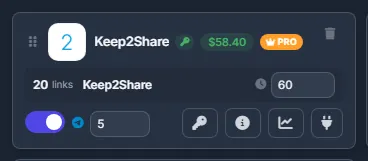
Account details and statistics
Click the “Account info” button (the i icon). What the “Account Information” dialog lists depends on the host:
- XFileSharing hosts, WayShare and FlorenFile — Email or Login, Balance, Storage Used / Storage Left (or Storage with a usage bar), Traffic Used / Traffic Left, Referrals, Premium and Premium Expires. Below them the chart “Last 7 Days Statistics” shows downloads and views per day.
- Keep2Share family — Balance, Traffic Left, Premium and Premium Expires, without a chart.
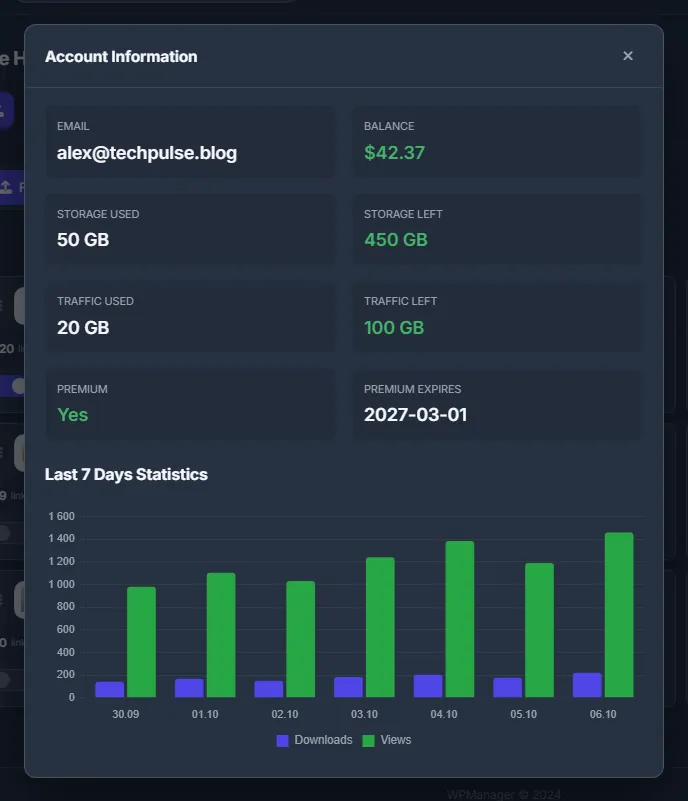
Balance history
Click the “Balance chart” button (the line-chart icon). The dialog “💰 Balance History — <account>” draws the balance over the chosen “Period”: Last 24 hours, Last 3 days, Last 7 days (the default), Last 30 days or Last 90 days. Under the chart you see Current, Change (with an arrow), Min, Max and Data points.
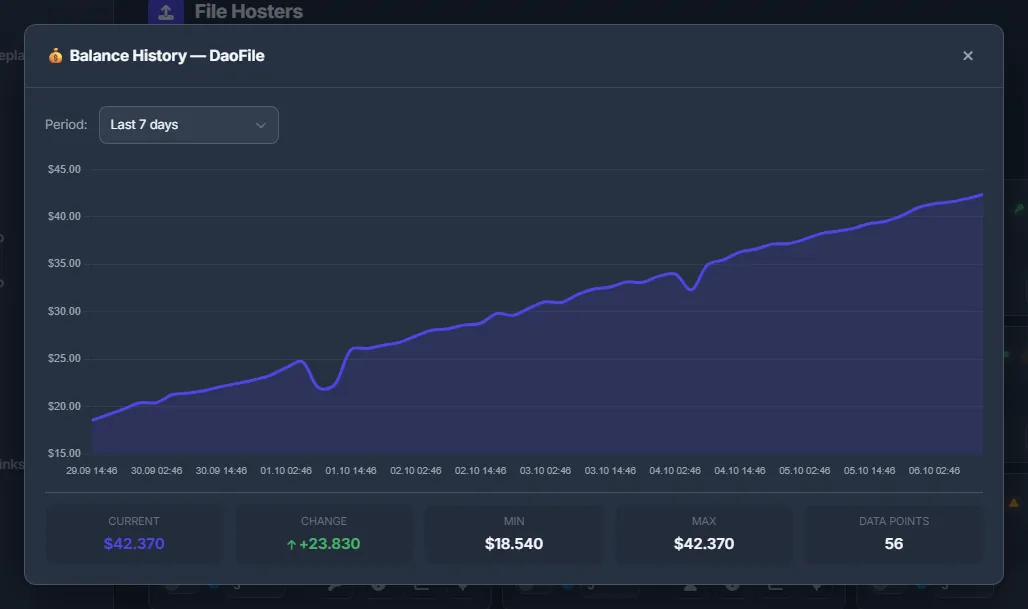
How often balances are read
The panel reads the balance of every active account with credentials every 10 minutes and keeps each reading for the chart. Right after you add an account, the chart says “No balance data yet” until the next reading.
The clock field on the card (5–10080 minutes, 60 by default; tooltip “Balance / link check interval, minutes”) is saved for each account. In the current version balances are read every 10 minutes for all accounts, whatever the field says.
Telegram alerts on balance changes
-
Connect Telegram
Open Account → Telegram alerts and connect your Telegram, if you have not done so yet.
-
Turn on the switch on the card
On the account’s card, turn on the switch next to the Telegram icon. You see “TG notifications ON”.
-
Set the threshold
In the ±$ field next to the switch, enter the smallest change since the last alert that should trigger a new message — 5 by default, 0 for every change. Smaller changes add up until together they reach the threshold.
Test the connection
Click “Test connection” (the plug icon). You see “API connection successful!” or “API test failed: …” followed by the host’s answer.
Settings
| Setting | What it does |
|---|---|
| Telegram switch | Sends a Telegram message when the balance changes by at least the threshold. |
| ±$ threshold | The smallest change since the last alert, in dollars. Default 5; 0 = every change. |
| Clock field (interval) | Interval of the account in minutes, 5–10080 (default 60). Saved; balances are currently read every 10 minutes. |
| Period (chart) | Last 24 hours, 3, 7, 30 or 90 days. |
Costs
Free.
Troubleshooting
| What you see | What to do |
|---|---|
| No Telegram messages arrive | Check that Telegram is connected on Account → Telegram alerts, that the switch on the card is on and that the change has reached the ±$ threshold. |
| The chart says “No balance data yet” | Readings are taken every 10 minutes — wait for the next one. Accounts without credentials are not read. |
| “Failed to get account info. Check if API key is set.” | Save the key in “API settings” and try again. 1Fichier accounts have no account info in the panel. |
FAQ
Can I see several months of balance?
The chart goes back up to 90 days — choose “Last 90 days”.
Do I get a message for every sale?
Only with the threshold set to 0. With the default of $5 you get a message once the balance has moved by $5 or more since the last alert.