
Plans & Pricing
Compare the plans, buy one for a month or a year from your USD balance, and learn how renewal, auto-renew and the plan limits work.
On this page
Where to find it: Account → Plans & Pricing, or the crown badge in the top bar.
Before you start
- For a paid plan: at least the plan's price on your USD balance. See USD balance and top-up.
The plans
Every new account starts with a 30-day free trial; after it you buy a plan. Plans are bought for a month or a year, and a year costs the same as ten months (about 17% less). These are the plans at the time of writing; the Plans page always shows the current prices and limits.
| Plan | Month | Year | Sites | Storage | Traffic / month | AI bonus |
|---|---|---|---|---|---|---|
| Free trial (30 days) | $0 | — | 3 | 5 GB | 100 GB | — |
| Basic | $10 | $100 | 5 | 50 GB | 300 GB | — |
| Advanced | $29 | $290 | 15 | 250 GB | 1 TB | $2 / month |
| Professional | $99 | $990 | 50 | 750 GB | 3 TB | $10 / month |
| Business | $249 | $2,490 | 150 | 2 TB | 10 TB | $25 / month |
All plans include the AI assistant, Sync & Scan, File backups, Link Replacer, Abuse Reports, File Hoster integration, Google integration, Advanced analytics and Storage over FTP / SFTP / WebDAV. Advanced adds Priority support; Professional adds API access too; Business has everything in Professional with the most room. Need a little more than your plan gives? Add extra storage or extra sites instead of moving up.
The free trial
A new account gets 30 days free with 3 sites, 5 GB of storage and 100 GB of traffic, and every tool. The trial is not a plan you can buy or renew. When it ends unpaid, the account is put on hold: sites are paused and the tools lock, but nothing is deleted. Buy Basic or a bigger plan on the Plans page and everything comes back at once. Topping up the balance alone does not buy a plan after the trial.
The free Referral plan for referral partners is assigned by support and is not offered here; a partner on it sees it on this page as the current plan.
Buy a plan
-
Open the page
Open Account → Plans & Pricing, or click the crown badge in the top bar. The page opens with the heading “Choose your plan”. Below the plan cards are the add-on cards (extra storage and extra sites) and the pay-as-you-go prices.
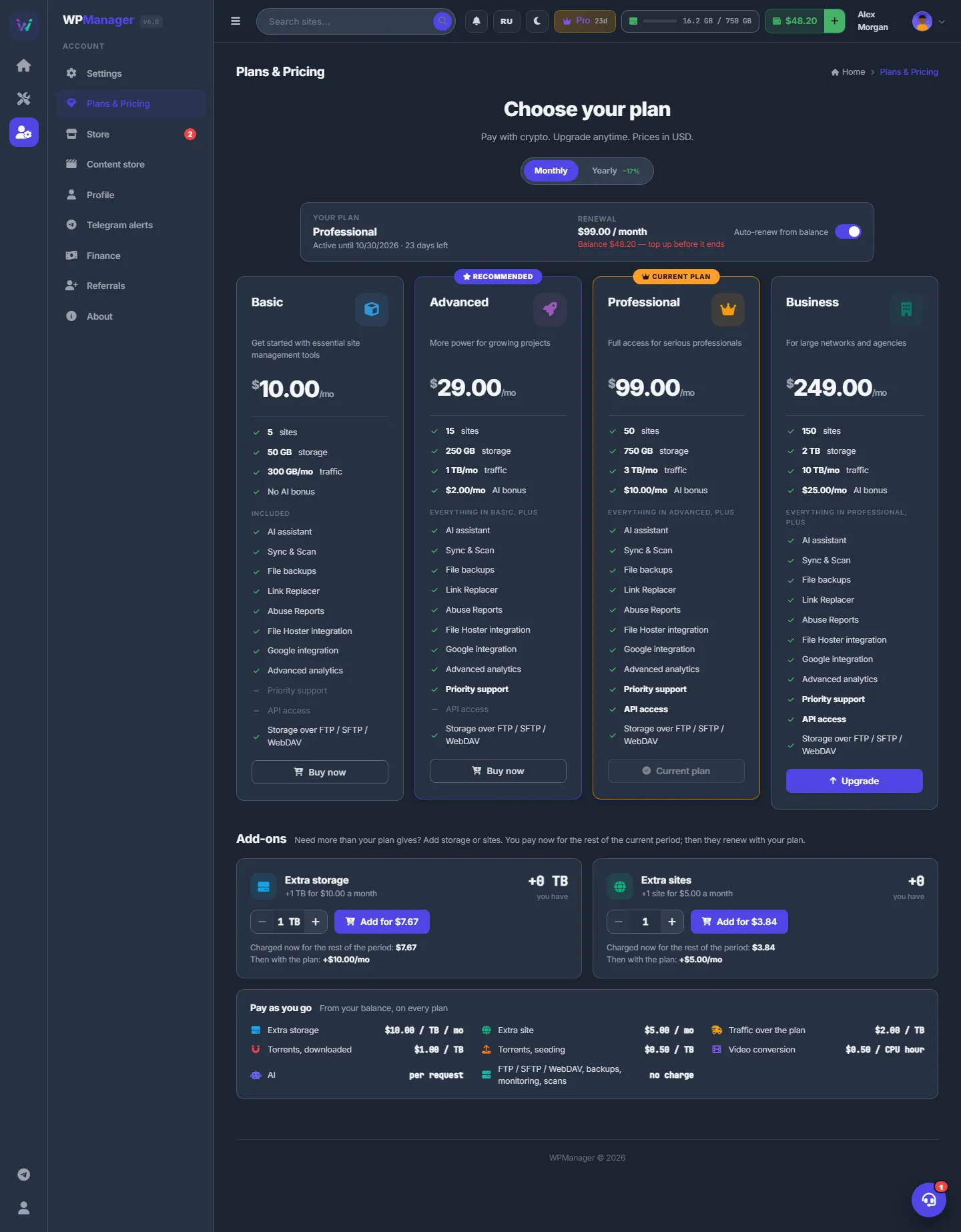
Fig. 1 Plans & Pricing: your plan at the top, all plans below, then the add-ons and the pay-as-you-go prices. -
Choose monthly or yearly
Use the “Monthly” / “Yearly” switch. The cards show the price per month or per year. The badge next to “Yearly” shows the saving the yearly prices give: at the current prices a year costs the same as ten months, about 17% less than twelve.
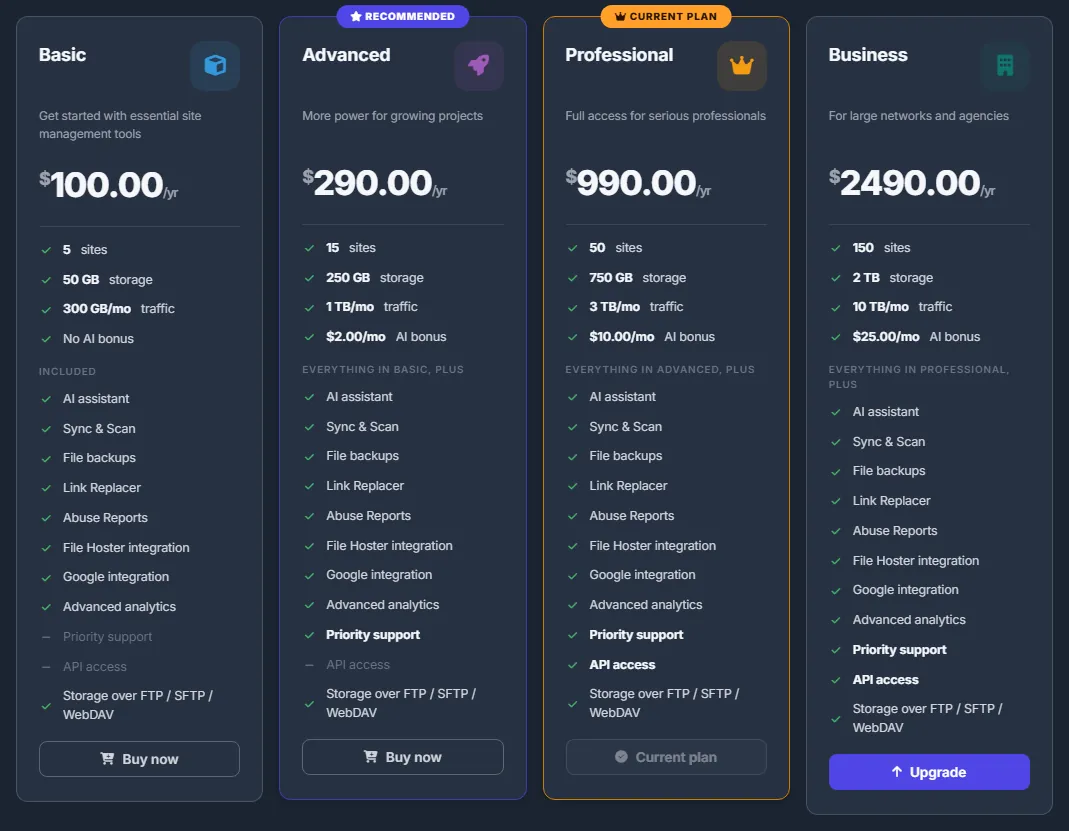
Fig. 2 Yearly prices. The AI bonus is still shown per month. -
Compare the cards
Each card shows the price, the number of sites, the storage, the traffic per month, the AI bonus per month and the included features (“Everything in X, plus”). Premium-download gigabytes and video-converter minutes are listed when a plan includes them. Your plan is marked “CURRENT PLAN”; during a trial and after a plan has ended, the mark reads “FREE TRIAL”, “TRIAL ENDED” or “PLAN ENDED”. “RECOMMENDED” goes to the Advanced plan, unless you are already on it; if there is no Advanced plan, it goes to the most expensive paid plan.
-
Click the button on the plan card
“Upgrade” on a plan above yours, “Buy now” on another paid plan, “Get started” on a free plan. Your own plan shows a disabled “Current plan” button. The exception is a trial or a plan that has ended without renewal: a free trial shows a disabled “Free trial” or “Trial ended” button, and a paid plan in that state shows “Buy now”.
-
Pay from the balance
The “Purchase: <plan>” dialog shows the price, the period — a month (30 days) or a year (365 days), starting today — the AI bonus credited immediately, and “Your balance”. Click “Pay $X from balance”. The plan is active immediately, and a notice confirms it together with the AI bonus.
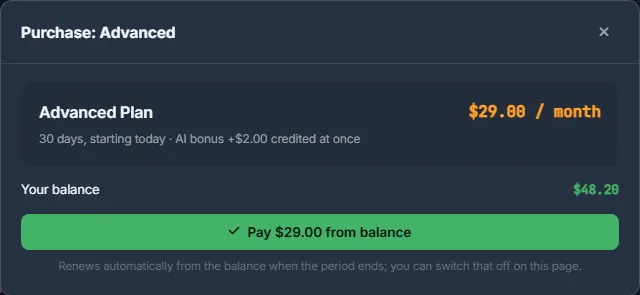
Fig. 3 Buying a plan from the balance. The AI bonus comes back to the balance immediately. -
Not enough money?
If the balance is short, the dialog says how much to add and shows “Top up balance” instead of the pay button. Top up, come back and buy — the plan activates instantly.
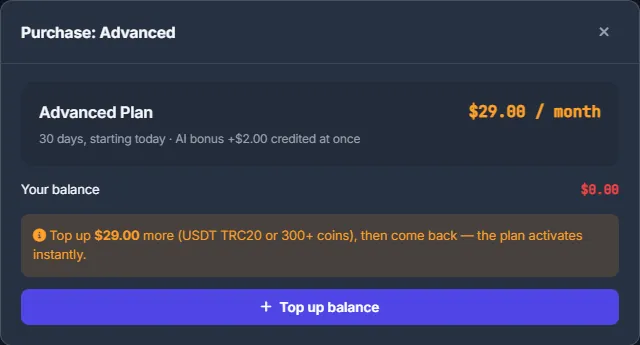
Fig. 4 Not enough money on the balance: top up first.
Add-ons: extra storage and extra sites
On the Plans page a paid plan can be extended with two add-ons:
| Add-on | Price | How it works |
|---|---|---|
| Extra storage | $10 per TB a month | Added in whole terabytes on top of the plan's storage. |
| Extra sites | $5 per site a month | Added one site at a time on top of the plan's site limit. |
- An add-on is charged at once for the rest of the current plan period, then renews together with the plan.
- You can remove extra storage only while your files fit into the quota without it, and extra sites only while your active sites fit into the plan's limit.
Your plan and auto-renew
The “Your plan” strip above the cards shows:
- the plan and “Active until <date> · N days left” (or “No expiry” for a plan without an end date);
- “Renewal” — the price of the next period, “$X / month” or “$X / year”;
- whether the balance covers it: “Balance covers it” in green, or “Balance $X — top up before it ends” in red;
- the “Auto-renew from balance” switch.
Turn the switch off if you do not want the plan renewed. The panel confirms “Auto-renew off — the plan ends on its expiry date”; turning it back on shows “Auto-renew on”.

How renewal works
Buying a plan turns auto-renew on. Once a day WPManager renews plans that have ended: if auto-renew is on and the balance covers the renewal price, the same plan is renewed for the same kind of period (month or year), and the AI bonus is credited again. Three days before the end, Telegram warns you if the renewal will not go through — the balance is short or auto-renew is off. While a plan with auto-renew waits for the daily renewal, its features keep working for up to 2 days.
When a plan ends
Without a renewal — or when the free trial ends unpaid — the account is put on hold: all its sites stop (no monitoring and no scans), and the panel opens only the Dashboard, Plans, Profile and support until you choose a plan. Telegram tells you when it happens. Nothing is deleted. A paid plan with auto-renew on renews within a day once the balance covers it; after the trial, or with auto-renew off, buy a plan on the Plans page and everything comes back at once.
Switching plans
- A different plan starts a new period today. The days left on the old plan are not carried over or refunded.
- You cannot buy a plan with room for fewer sites than you have active: “<Plan> allows N sites and you have M active. Delete K of them first, or pick a bigger plan.” Sites paused after a plan ended do not count.
- The card of your current plan has no buy button: the plan renews by itself.
What the limits mean
| Limit | What it means |
|---|---|
| Sites | How many sites the account can hold, plus any extra sites you added. One more is refused with “Site limit reached (N). Upgrade your plan or contact admin.” |
| Storage | The size of your file storage (Files, downloads, studios), plus any extra storage you added. When it is full, uploads and downloads stop with a “Storage quota exceeded” message. |
| Traffic / month | Outgoing traffic included each calendar month (backup traffic moved through the panel). Above it, each TB costs $2 from the balance — see Traffic. |
| AI bonus | Money credited to your balance with every purchase and renewal: 12 months' worth in one go for a yearly purchase, never more than the price paid. It is ordinary balance — spend it on AI or on anything else. |
| Premium downloads, GB / month | Gigabytes per calendar month you can download through WPManager's shared premium accounts before paying per GB. Shown only when the plan includes them. |
| Video converter, min / month | CPU minutes per month for Video studio and “Convert video” before paying per CPU hour. Shown only when the plan includes them. |
| Features | The list on the card. Every current plan includes every feature; the Dashboard, Settings and About are always open. |
The plan badge in the top bar
The crown badge always shows your plan and the days left. From 7 days before the end it reads “Nd left” in a warning colour, and after the end — “expired”. Click it to open this page.

Individual prices and special plans
Support can give your account its own price for a plan (the card then shows it), a personal site limit or storage quota, or a partner plan that cannot be bought on this page.
Costs
The plan's price is taken from the USD balance at purchase and at every renewal. Prices are set by WPManager and shown on this page; an individual price for your account appears on its card. The plan's AI bonus comes back to the balance right away. Add-ons are charged with the plan. Usage beyond the plan — traffic over the allowance, AI, torrents and the rest — is paid separately; see What you pay for.
Troubleshooting
| What you see | What to do |
|---|---|
| “Insufficient balance: $X needed, $Y available” | Top up the difference with the “Top up balance” button in the dialog, then buy again. |
| “The price of <plan> for your account is $X. Reload the page and try again.” | The price changed while the page was open. Reload and check the new price before paying. |
| “<Plan> allows N sites and you have M active…” | Delete the extra sites first, or pick a bigger plan. |
| The trial ended and topping up changed nothing | After the trial a top-up does not buy a plan by itself. Open the Plans page and buy Basic or a bigger plan. |
| Sites stopped being checked after the plan ended | The plan ended unpaid, so the account is paused. Top up and buy a plan (or let the auto-renewal take the balance) and the sites come back automatically. |
FAQ
Can I pay for a plan by card?
Plans are paid from the USD balance, and the balance is topped up with cryptocurrency — see USD balance and top-up.
How do I cancel?
Turn off “Auto-renew from balance”. The plan works until its end date, then the account is paused until you choose a plan again. Nothing is deleted.
What happens when the free trial ends?
The account is put on hold: sites paused, tools locked, nothing deleted. Buy Basic or a bigger plan on this page and everything comes back.
Can I pay for several months ahead?
The current plan renews by itself. To pay for a year in advance, choose “Yearly” when you buy the plan.
Can I switch my current plan from monthly to yearly?
Not on the card of the current plan — it has no buy button and renews for the same kind of period. Choose “Yearly” when you buy a plan.