
Retention: do visitors come back?
Retention groups new visitors by the day or week of their first visit — cohorts — and shows what share of them came back later: as a curve, as a new-versus-returning chart and as a cohort table.
On this page
Where to find it: Overview → Dashboard → click the site → Analytics → “Retention”.
Before you start
- The WPManager plugin is installed and connected on the site (site page → “Settings” → “Connection”). See Installing and connecting the WPManager plugin.
- WPManager plugin 7.3 or newer. Cohorts fill in from the day this version is installed, so give it a few days — or weeks, for weekly cohorts.
Read the retention view
-
Open Retention
In Analytics click “Retention”, then choose “Daily” or “Weekly” and the period.
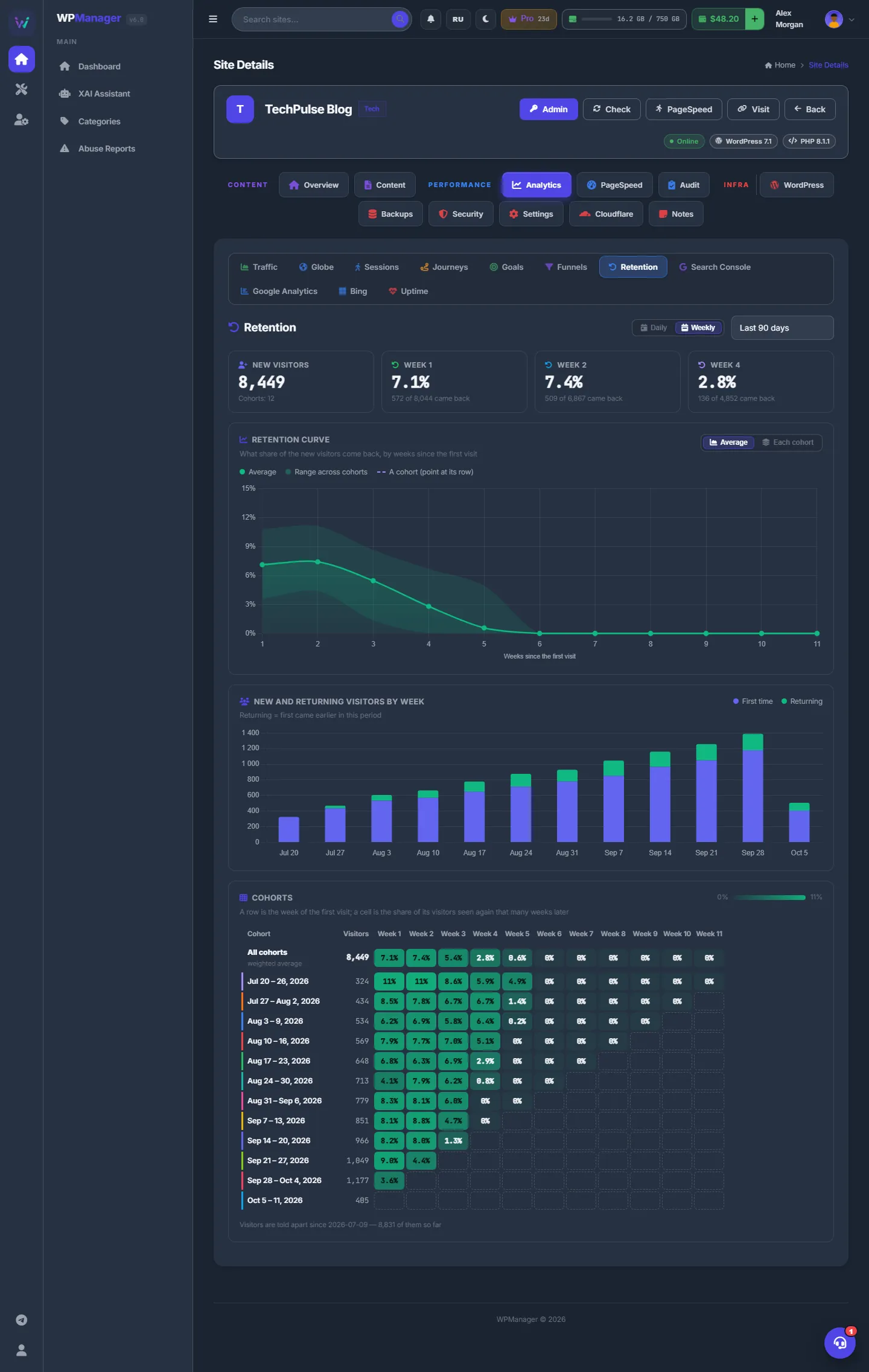
Fig. 1 Weekly cohorts over 90 days: return rates, the retention curve, new versus returning visitors and the cohort table. -
Read the headline
“New visitors” shows how many first-time visitors the period had and in how many cohorts. Next to it are three return rates — Day 1, Day 7 and Day 30 (in weekly mode Week 1, Week 2 and Week 4) — each with “X of Y came back”.
-
Read the curve
“Retention curve” shows the average share of new visitors seen again N days (or weeks) after their first visit, with the range across cohorts shaded behind it. “Average” / “Each cohort” switches to one line per cohort. Hovering a row of the cohort table draws that cohort’s own line.
-
Read the cohort table
In “Cohorts”, a row is the day (or week) of the first visit with its number of visitors; a cell is the share of them seen again that many days (weeks) later — the greener, the higher. The first row, “All cohorts”, is the weighted average. Empty outlined cells are periods a cohort has not reached yet.
New and returning visitors
The bar chart “New and returning visitors by day” (or by week) stacks “First time” and “Returning” visitors. A returning visitor is one who first came earlier in the same period. Hover a bar to see the returning share.
How a visitor is recognised
The visit counter keeps a random id in the visitor’s browser storage, so the same browser on a later day is the same visitor. If the visitor clears the browser storage or comes from another device, they count as a new visitor. That is why real return rates are, if anything, a little higher than shown.
Settings
| Setting | What it does |
|---|---|
| “Daily” / “Weekly” | Cohorts by day (up to 30 columns) or by week (up to 12 columns). |
| “Average” / “Each cohort” | One average curve, or a line per cohort. |
| Period | The same period list as the other Analytics views. |
Costs
Free.
Troubleshooting
| What you see | What to do |
|---|---|
| “No cohorts yet” | Retention needs plugin 7.3 or newer and fills in from the day it is installed. Update the plugin and wait a few days. |
| The right part of the table is empty | Young cohorts have not lived long enough: a cohort from last week cannot have a “Week 4” value yet. |