
Forum posts and themaPoster export
Keep a post template for every forum you post to, then build ready-to-paste posts for many files at once — with download links, screenlists and AI text. Copy them, or export them as one .txt file or as a .zip that the themaPoster program posts by itself.
On this page
Where to find it: Content → Posting templates → tab “Forums” (forum templates); Links & files → Files → (select) → “Post” (building posts). On the File Hosters page, the link “Forum templates moved to Posting templates” leads here.
Before you start
- Files in your storage (Files).
- For download links: file-host accounts.
- For pictures: an image host.
Three ways to make forum posts
- Files → “Post” (Build post) — one screen for many files: template, links, pictures, AI, export. Described on this page.
- Files → “Publish with AI” with a forum as the target — the guided assistant; export from its bottom bar. See Publish with AI.
- Conveyor → step “Forum post” saving a .txt or a themaPoster .zip — fully automatic, together with screenlists, uploads and the AI text. See the Forum post step.
All three use the forums and templates you set up below.
Set up a forum
-
Add a forum
Open Content → Posting templates → tab “Forums” and press “Add a forum”. In the “Forum” card fill in the Name, the Address (optional — it tells the AI which forum it writes for) and the Format of the forum’s posts: BBCode, HTML, Markdown or Text.
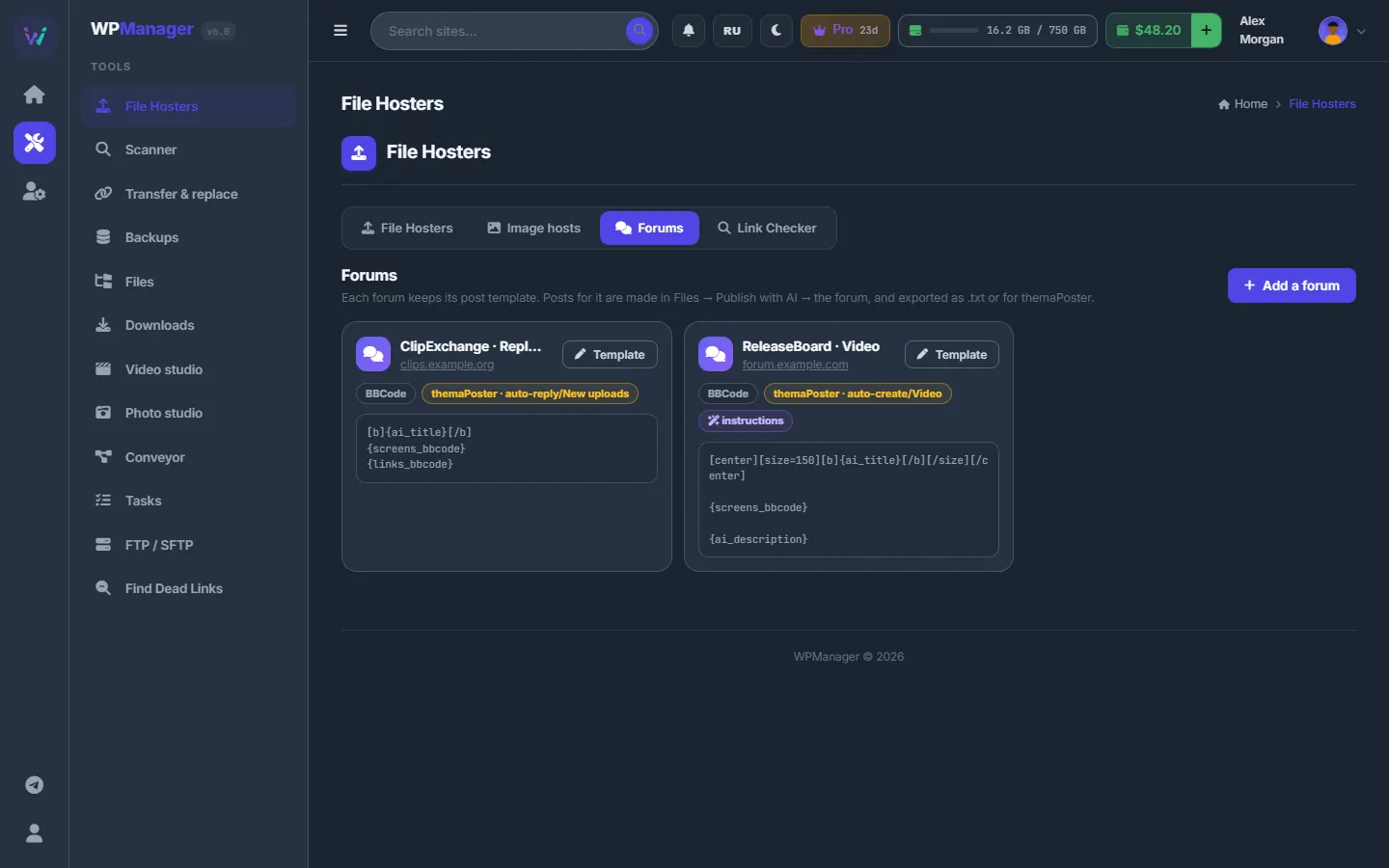
Fig. 1 Two forums, each with its format, themaPoster section and template. -
Write the templates
In the “Templates” card set the Thread title (for example
{ai_title} [{resolution}]) and the Post body. “Start from” offers ready bodies for the chosen format; for BBCode they are Release post, Centered, Frames + spoiler and Short.“Insert” lists the fields you can use; click one to put it where the cursor is (the full list is below). The preview on the right shows the post on sample data, and “The text as it will be copied” shows the raw markup.
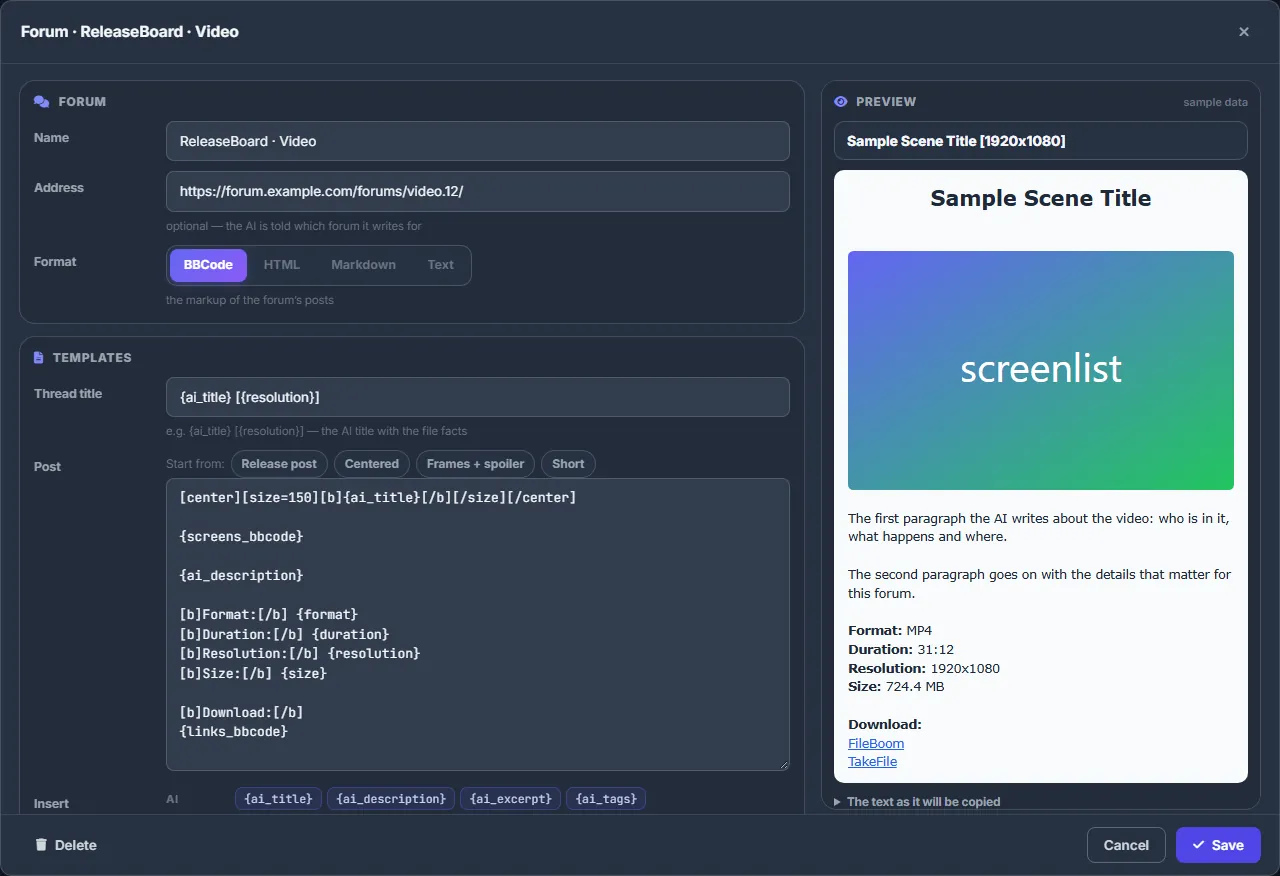
Fig. 2 The forum editor: a BBCode template on the left, the post rendered on sample data on the right. -
Set the AI, pictures and themaPoster
In “AI and pictures” add Instructions the AI follows in every post for this forum (language, length, no emojis…), a Language and the Image host for this forum’s screenlists and frames.
In “themaPoster” choose Posts go as — New threads or Replies — the Section or group exactly as it is named in themaPoster, an optional Prefix, and “Pass the tags (<tags>)”. The line under them shows where the posts will land, for example
auto-create/<section>/<thread title>.txt. Press “Save”.
Template fields
| Group | Fields |
|---|---|
| AI | {ai_title}, {ai_description}, {ai_excerpt}, {ai_tags} |
| File | {name}, {format}, {size}, {duration}, {minutes}, {resolution}, {video}, {audio}, {fps}, {bitrate}, {facts}, {mediainfo}, {md5}, {definition}, {audio_languages}, {sub_languages}, {folder}, {folder_fw}, {parts}, {total_size} |
| Links | {links_as:Download | Play it online || Download}, {links_bbcode}, {links}, {link:FileBoom} |
| Pictures | {screens_bbcode}, {screens_full_bbcode}, {shots_bbcode}, {screens}, {cover_bbcode}, {cover_full_bbcode}, {cover} |
| Other | {date}, {n} |
The links field {links_as:…}
{links_as:Download | Play it online || Download} writes every link with your own text. The part before || is used for hosts with an online player, the part after it for all other hosts. Inside the text, %host% is replaced by the host name and %part% by the volume number. {link:FileBoom} puts in the link of one host only.
Build posts for many files
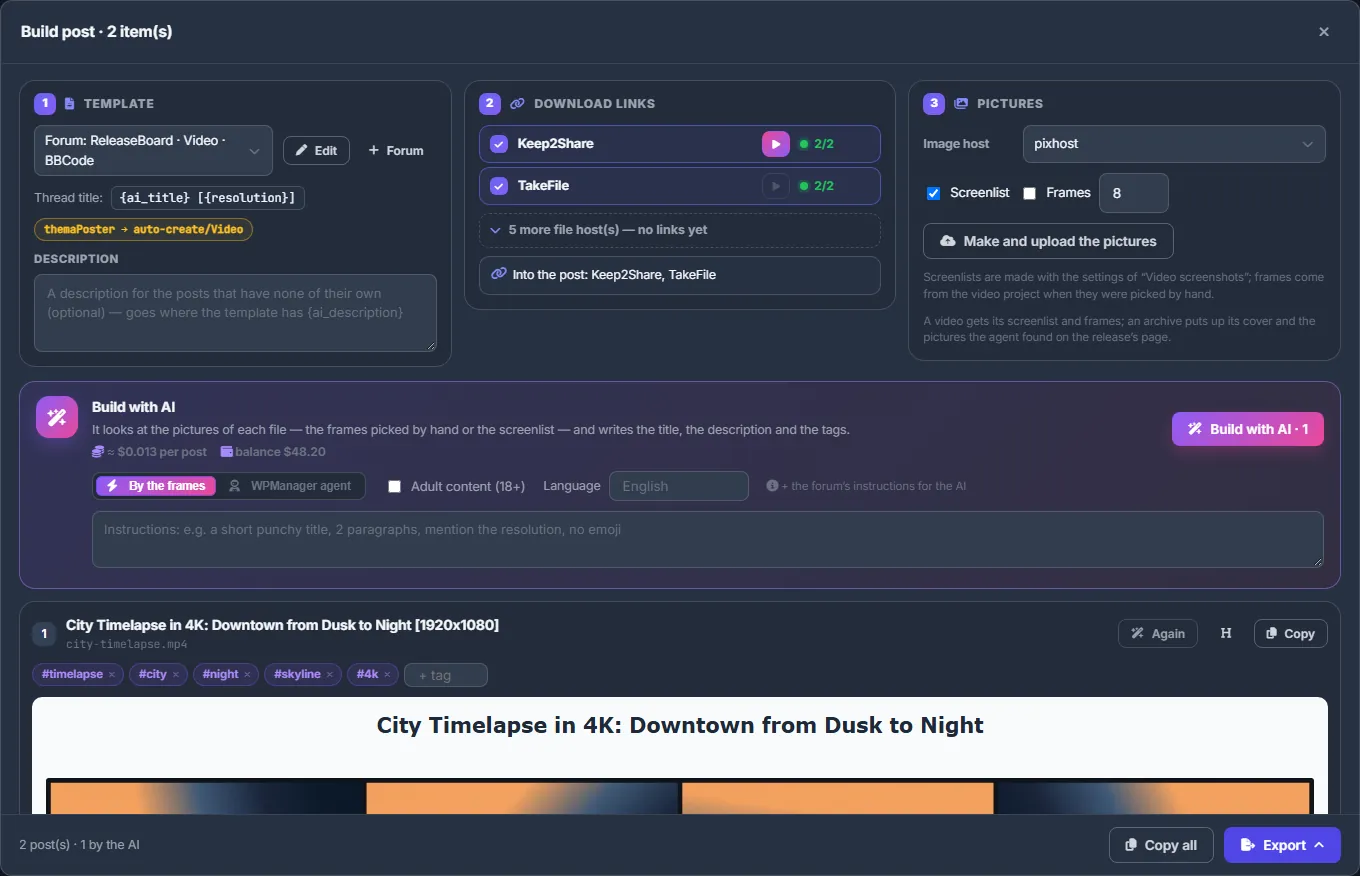
In Links & files → Files tick the files and press “Post”. The “Build post” icon is also in the row of a folder, a video or an archive. The “Build post” window has three cards at the top:
- Template — a forum, a saved template, or “My own template — typed here”. “Edit” opens the forum’s template; “+ Forum” adds a forum.
- Download links — which hosts go into the posts, and “Upload the missing files” for files that have no links yet.
- Pictures — the Image host, Screenlist, Frames (1–32) and “Make and upload the pictures”.
Under them is the AI bar: “Build with AI” with “By the frames” or “WPManager agent”, “Adult content (18+)”, Language and Instructions. The bar shows the expected price per post and your balance.
Below are the posts themselves. Click a title or description to edit it right there (Esc cancels). “AI” or “Again” rewrites one post; “Copy” copies it.
Export
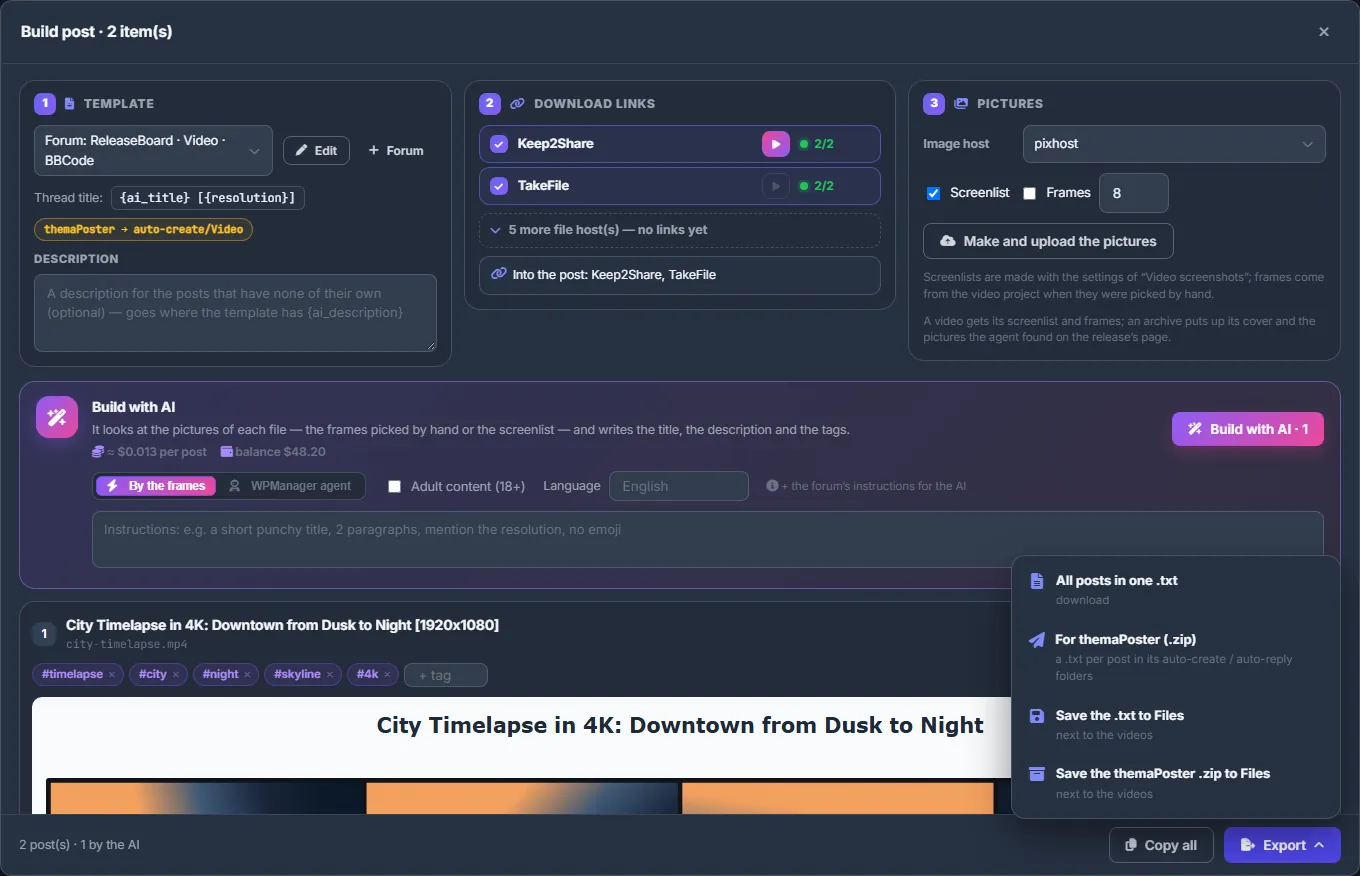
At the bottom, “Copy all” copies every post. “Export” offers:
- “All posts in one .txt” — a download;
- “For themaPoster (.zip)” — one .txt per post in themaPoster’s auto-create or auto-reply folders;
- “Save the .txt to Files” and “Save the themaPoster .zip to Files” — saved next to the videos.
Unpack the themaPoster zip into themaPoster’s user folder, and the program posts the threads itself.
Texts are kept in the files’ projects
What the AI wrote and what you corrected is kept with each file. The posts come back next time without paying again, and the Conveyor and Publish with AI use the same text.
Settings
| Setting | What it does |
|---|---|
| Format | BBCode, HTML, Markdown or Text — the markup of the forum’s posts and of the preview. |
| Thread title, Post | Templates with fields. The thread title usually wraps the AI title with facts of the file. |
| Instructions, Language, Image host | Applied to every post for this forum. |
| Posts go as, Section or group, Prefix, Pass the tags | themaPoster export: the auto-create (new threads) or auto-reply (replies) folder, the section name, a title prefix and a <tags> line. |
Costs
Forums, templates and export are free. “Build with AI” is paid per post from your balance; the window shows “≈ $… per post” based on your recent posts. The WPManager agent is paid by its tokens. Rewriting a post is paid again. See What you pay for.
Troubleshooting
| What you see | What to do |
|---|---|
| “N post(s) still wait for their links — the placeholders are in the text” | Some uploads have not finished, so their placeholders are still in the text. Wait for the uploads and export again. |
| “Not enough money on the balance for the AI — top it up and press the button again.” | Press “Top up”, then “Build with AI” again. Posts already written are kept. |
| A picture field is empty in the post | Make and upload the pictures in card 3 with an image host chosen. The screenlist settings come from Video screenshots. |
FAQ
What is themaPoster?
A separate desktop program that posts threads to forums from .txt files in its folders. The panel prepares those files; it does not post to forums itself.
Can I edit a post after the AI wrote it?
Yes. Click the title or description in the post; your edit is kept and never overwritten by the AI.
Can I keep several templates for one forum?
Each forum has one template. For a different layout, add the same forum again under another name — for example “Forum X · short”.