
What you pay for
Your plan covers the panel itself, a number of sites, a storage quota and a monthly traffic allowance. Extra storage and extra sites, traffic over the allowance, AI, torrents, premium downloads, video conversion, abuse removal and Store purchases are paid from the USD balance as you use them. This page lists every rate and explains how each item is counted.
On this page
Where to find it: Account → Profile → “Storage & traffic” → “Your rates” · Profile → “Transactions” · Account → Plans & Pricing for the add-ons.
See your rates and spending
-
Check your rates
Open Account → Profile. In the “Storage & traffic” card the “Your rates” block lists AI (“per request”; each answer shows its price), the add-ons (extra storage per TB a month, an extra site a month), traffic (your plan's monthly allowance, then the price per TB), torrents (per TB downloaded and seeded) and video conversion (per CPU hour). Under it: the plan traffic used this month and how far usage may take the balance below zero.
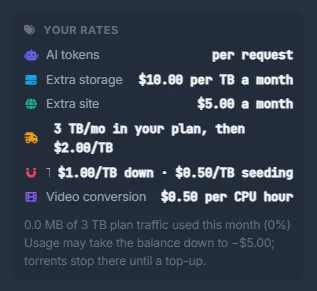
Fig. 1 Your rates: AI, add-ons, traffic, torrents and video conversion. -
Follow what you spend
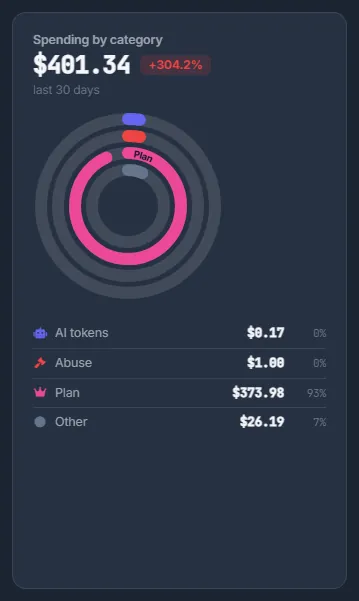
The “Spent” card, the “Cash flow” chart, “Spending by category” and “Daily spending” on the Profile show where the money goes. In “Transactions”, filter by “AI”, “Storage” or “Traffic”: every line says what was charged and why — for AI, the feature, the model, the tokens and the price of that request.
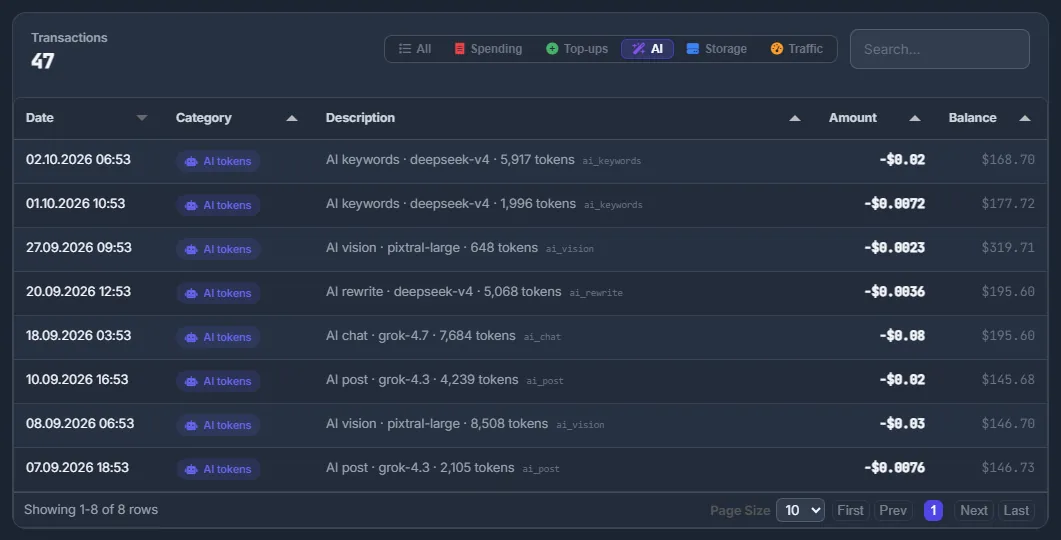
Fig. 2 Every AI request in the log: the feature, the model, the tokens and its price.
What is charged
The rates at the time of writing; the panel always shows the current ones.
| Item | Price and how it is counted | When it is charged |
|---|---|---|
| Plan | A fixed price per month or year: Basic $10, Advanced $29, Professional $99, Business $249 a month | At purchase and at every renewal |
| Extra storage | $10 per TB a month, an add-on in whole terabytes | At purchase for the rest of the plan period, then with every renewal |
| Extra sites | $5 per site a month, an add-on | At purchase for the rest of the plan period, then with every renewal |
| Traffic | $2 per TB of outgoing traffic above your plan's monthly allowance | Once a day, for what is new this calendar month |
| AI | Per request; each answer and each charge shows its price | Right after each request |
| Torrents | $1 per TB downloaded, $0.50 per TB seeded (uploaded) | Once a day, for what is new this calendar month |
| Premium downloads | Free through your own premium accounts; per GB through WPManager's shared accounts, at that file host's price | When the download finishes |
| Video conversion | $0.50 per CPU hour above the minutes your plan includes | After each run |
| Abuse removal | $0.10 per successful action; “Ignore” is free | After the actions run |
| Store and Content store | The listed price | At purchase |
Plans
A fixed price per month or year, taken from the balance at purchase and at every renewal; a year costs the same as ten months. Every new account starts with a 30-day free trial (3 sites, 5 GB of storage, 100 GB of traffic); after it, a plan is bought on the Plans page. The plan's AI bonus comes back to the balance immediately. See Plans & Pricing.
Storage
Your plan includes a storage quota: 50 GB on Basic, 250 GB on Advanced, 750 GB on Professional, 2 TB on Business. Need more without moving to a bigger plan? Add “Extra storage” on the Plans page in whole terabytes at $10 per TB a month. The add-on is charged at once for the rest of the current plan period, then renews together with the plan. You can remove it once your files fit into the quota without it.
Extra sites
Your plan sets how many sites the account holds. One or two over the limit? Add “Extra sites” on the Plans page at $5 per site a month, with the same rules as extra storage: charged for the rest of the current period at once, renewed with the plan, removable when you have fewer sites.
Traffic
Every plan includes outgoing traffic each month: 100 GB on the trial, 300 GB on Basic, 1 TB on Advanced, 3 TB on Professional, 10 TB on Business. What is metered is the backup traffic moved through the panel. Above the allowance each TB costs $2. Traffic is added up per calendar month and charged once a day for what is new, so no gigabyte is paid twice; the allowance starts again on the 1st.
AI
Every AI request — the XAI Assistant chat and agent, rewriting, titles, tags, keywords, image analysis, SEO advice, “Publish with AI”, the AI steps of the Conveyor — is charged from the balance per request, and each answer shows its price. The price depends on the model and the tokens the request used; it is rounded up to $0.0001 and charged right after the request, and the same amount appears in “Transactions”.
Before a request starts, the balance must cover its worst-case cost: “Insufficient balance for this AI request (it may cost up to $X) — top up on the Profile page to use AI features.” An agent turn needs a small reserve.
Torrents
Torrents run on the server through a VPN. Each TB downloaded costs $1, and each TB the server seeds (uploads to other peers) costs $0.50. Like traffic, the amounts are added up per calendar month and charged once a day for what is new. See Torrents: magnets and .torrent files.
Premium downloads
Downloads with your own file-host accounts or API keys are free. Downloads through WPManager's shared premium accounts cost a price per GB that depends on the file host, charged when the download finishes. Your plan's included gigabytes for the month, if any, are used first. Removing an unfinished premium download charges the gigabytes it has already taken. See Premium accounts and premium download prices.
Video conversion
Video studio and “Convert video” measure the processor time of each run. Minutes above what your plan includes this month cost $0.50 per CPU hour; copying streams without re-encoding is free. When your minutes are used up, a task needs at least $0.01 on the balance to start (“Top up your balance to use the video converter”). See Video studio.
Abuse removal
Each successful action on an abuse report — changing the slug, making the post private, deleting it — costs $0.10. “Ignore” is free. The balance must cover all selected actions before they run, and only the successful ones are charged. See Abuse reports.
Store and Content store
Themes, engines, plugins, invoices and videos are paid from the balance at their listed price. See Store and Content store.
Everything else
Free on every plan: storage access over SFTP / FTP / WebDAV, site backups, monitoring and alerts, PageSpeed, security scans, link checks, the Finance planner and the other tools — they come with your plan. The Conveyor has no price of its own: each of its steps pays its own rate.
Daily charges and a negative balance
Traffic and torrents are charged once a day for what was used since the last charge. Because AI, traffic and torrents are charged after the fact, the balance can go slightly negative — but never below −$5. At that limit the paid tools stop and running torrents are paused until you top up; what your plan covers keeps working. The next top-up covers the negative amount first. The minimum top-up is $10 — see USD balance and top-up.
Your rates
| Line in “Your rates” | What it means |
|---|---|
| AI: per request, each answer shows its price | AI is paid per request from the balance; the price of each answer is shown with the answer and in “Transactions”. |
| Storage | Your quota (plan plus any extra storage) and the price of an extra TB a month. |
| Traffic: GB per month, then $ per TB | Your plan's monthly allowance, how much of it is used, and the price per TB above it. |
Costs
All rates are set by WPManager and shown in the panel: AI, storage and traffic in Profile → “Your rates”; plan prices and the add-ons on Plans & Pricing; premium-download and converter prices where you start those tasks.
Troubleshooting
| What you see | What to do |
|---|---|
| “Insufficient balance — top up on the Profile page to use AI features.” | Top up the balance; AI works again immediately. See USD balance and top-up. |
| “Top up your balance to use the video converter” | Your plan's converter minutes are used up. Top up and start the task again. |
| The balance is negative and torrents are paused | Charges for AI, traffic or torrents already used reached the −$5 limit. Top up; the paid tools work again and you can resume the torrents. |
| Extra storage cannot be removed | Your files do not fit into the quota without it. Delete or move files first. |
FAQ
Why does an AI request cost a fraction of a cent?
You pay for the tokens the request actually used, not a flat fee per request. Each answer shows its price, and the charge appears in “Transactions”.
Does my referrer cost me anything?
No. WPManager pays the referral share; your prices are the same. See Referral program.
What happens when the balance reaches $0?
What your plan covers keeps working. Usage charged after the fact — AI, traffic, torrents — can take the balance down to −$5; at that point the paid tools stop and torrents pause until you top up. Purchases need the full amount on the balance.
Is a gigabyte of traffic ever charged twice?
No. Traffic and torrents are added up per calendar month, and each daily charge covers only what is new since the previous one.