
Storage tasks: limits and queues
Archives, conversions, screenshots, checksums, uploads to file hosts, image hosts and servers, Video studio jobs and copies from your servers all run on the server as tasks. The Tasks page shows their progress, speed and results and lets you stop them.
On this page
Where to find it: Overview → Tasks, or the “Tasks” button on the Files page.
Follow your tasks
-
Open Tasks
Open Overview → Tasks, or press “Tasks” on the Files page — both show the number of running tasks as a badge. The tiles on top count “Running” (with the total speed), “Queued”, “Done” (with the amount of data processed) and “Failed”.
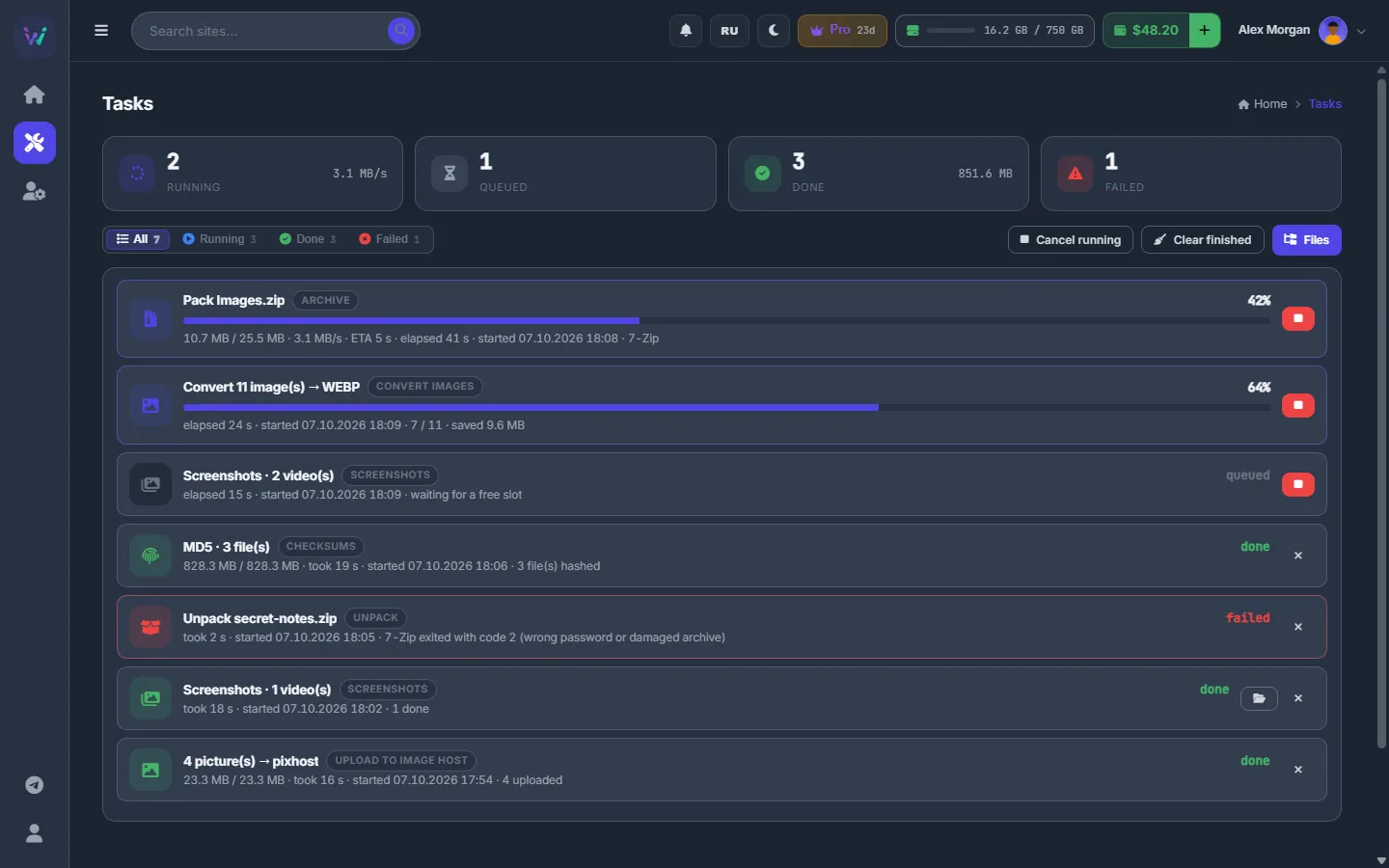
Fig. 1 Running, queued, finished and failed tasks on one page; the failed unpack says why it stopped. -
Read a task
Each row shows the title and the kind — “Archive”, “Unpack”, “Convert images”, “Download”, “Upload to file host”, “Upload to image host”, “Upload to server”, “Screenshots”, “Video”, “Checksums” and so on — plus the host for uploads. Then come the percentage and a bar, done and total size, speed, time left, elapsed time, start time and the server’s message. A finished upload shows its link with a copy button. “waiting for a free slot” means the task is queued.
-
Filter, open, stop
Use the filters “All”, “Running”, “Done” and “Failed”. On a row:
- the folder button of a finished task opens its result in Files;
- the stop button cancels a running or queued task;
- × removes a finished task from the list.
At the top, “Cancel running” stops all running tasks after a confirmation, “Clear finished” removes the finished ones from the list, and “Files” takes you back to the storage.
How many run at the same time
Heavy tasks — archive, unpack, image conversion, screenshots, checksums — run two at a time per account by default. Video studio jobs have a lane of their own, so a long conversion does not hold back your archives. Everything else waits as queued and starts as soon as a slot frees.
How long tasks are kept
The page shows your latest 50 tasks. Finished tasks disappear by themselves after 6 hours. The list also starts empty after the panel is restarted, for example after an update. The files that the tasks made stay in your storage either way.
Costs
Tasks themselves are free. Video studio jobs may be billed per CPU hour; the studio shows the current price before you start — see Video studio: costs.
Troubleshooting
| What you see | What to do |
|---|---|
| A task stays queued for a long time | Your other heavy tasks are using the slots. Wait, or stop some of them. |
| A task failed | The message on the row says why — a wrong password, the quota, a host error. Fix the cause and start the action again. |
FAQ
Are link downloads and torrents here too?
They have their own page, Downloads, with speeds, the queue and details for every file.
Do I lose the result if I clear a task?
No. Clearing removes only the row; the archive, pictures or video it made stay in your storage.