
Cloudflare tab: cache, Under Attack and DNS
Once Cloudflare is connected, the site’s Cloudflare tab purges the cache, switches Development Mode and Under Attack, shows the traffic and who Cloudflare stopped, lists the DNS records and changes the main zone settings, with recommendations for WordPress.
On this page
Where to find it: Dashboard → click the site → Cloudflare tab → Overview, Analytics, Security, DNS or Settings.
Before you start
- Cloudflare is connected on the site’s Cloudflare tab — see Connecting Cloudflare. Each part of the tab needs its permission in the token; the “API token” card on “Overview” shows which are there.
Quick actions in the header
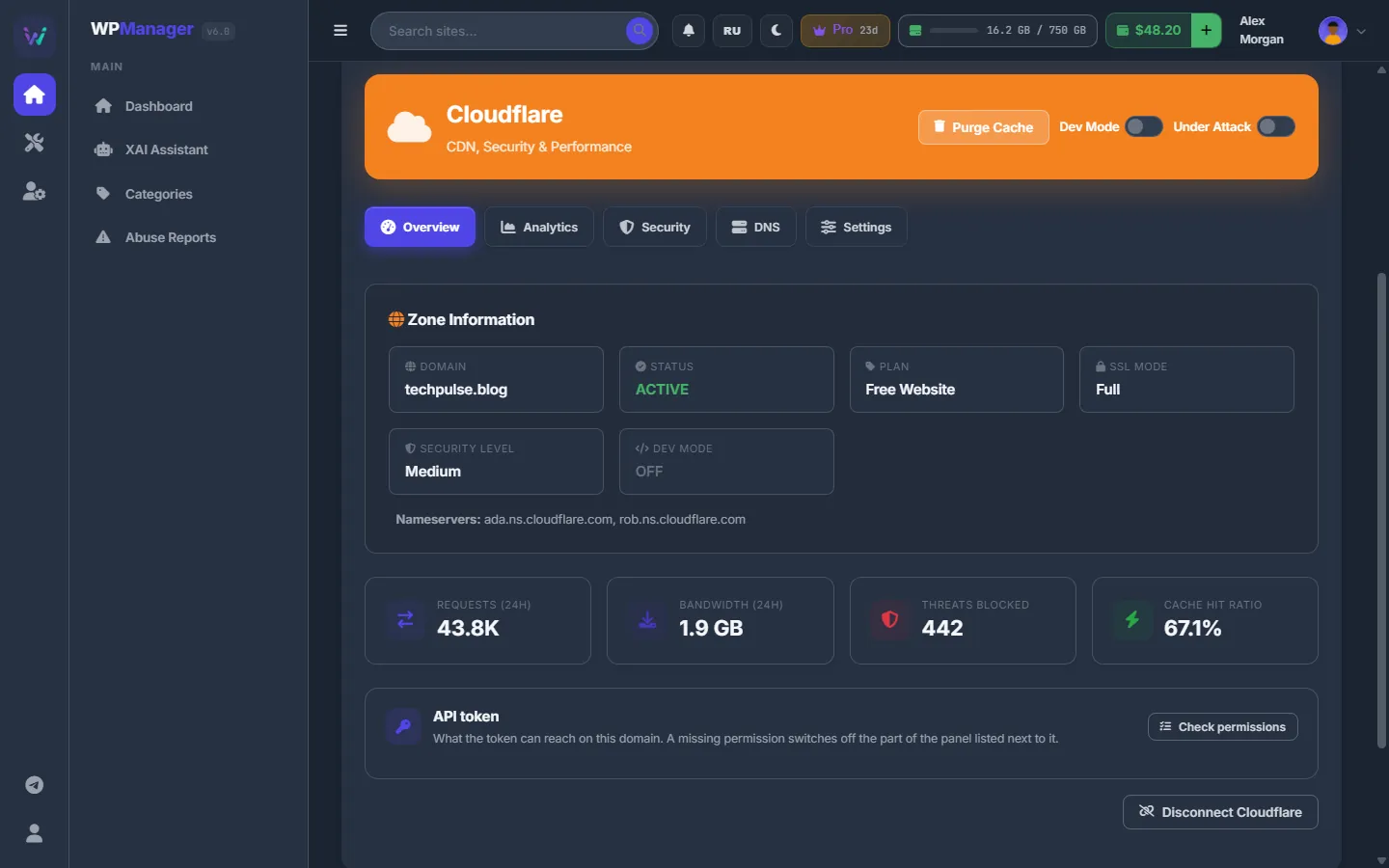
- Purge Cache asks “Purge all cached files?” and clears everything Cloudflare cached for the domain.
- Dev Mode bypasses the cache while you work on the site; Cloudflare turns it off by itself after 3 hours.
- Under Attack asks to confirm, then shows a check page to every visitor. Switching it off returns the security level to Medium.
Overview
Zone information — Domain, Status, Plan, SSL Mode, Security Level, Dev Mode and Nameservers — and the last 24 hours: Requests, Bandwidth, Threats Blocked and Cache Hit Ratio. Below are the “API token” card with “Check permissions”, and “Disconnect Cloudflare”.
Analytics
Pick “Last 24 hours”, “Last 7 days” or “Last 30 days” to see totals and charts of requests, cached and uncached traffic, bandwidth and threats.
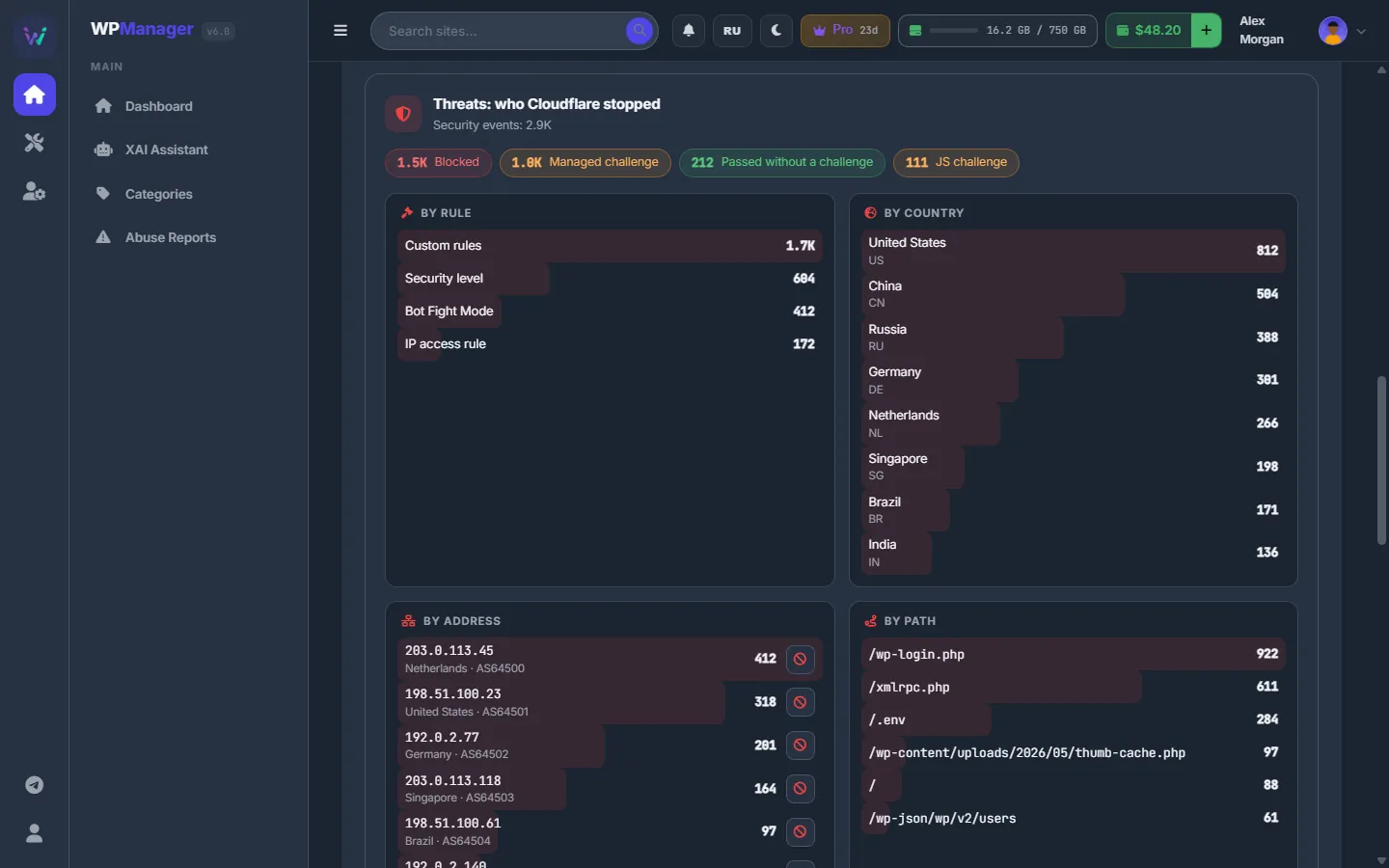
“Threats: who Cloudflare stopped” breaks the security events down by action, rule, country, address and path, and lists the latest events. An address can be blocked right from there. Cloudflare keeps security events for 31 days.
Security
The security level (Essentially off … Under attack) and the same one-click rules, allowlist and other zone rules as on the site’s Security tab — see Firewall and Cloudflare rules.
DNS
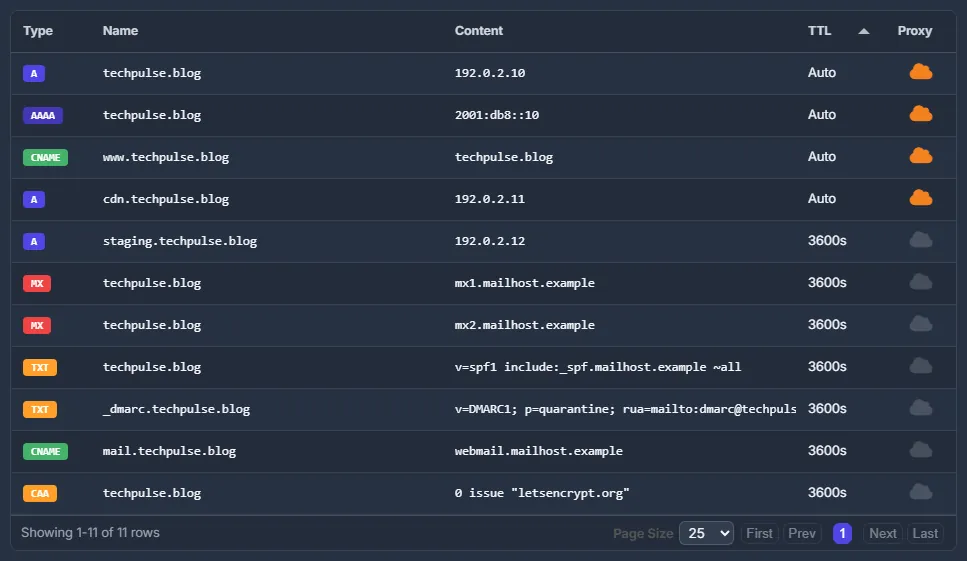
“DNS Records” lists Type, Name, Content, TTL and Proxy (an orange cloud means the traffic goes through Cloudflare), with search and export. The list is read-only: edit records in Cloudflare itself.
Settings
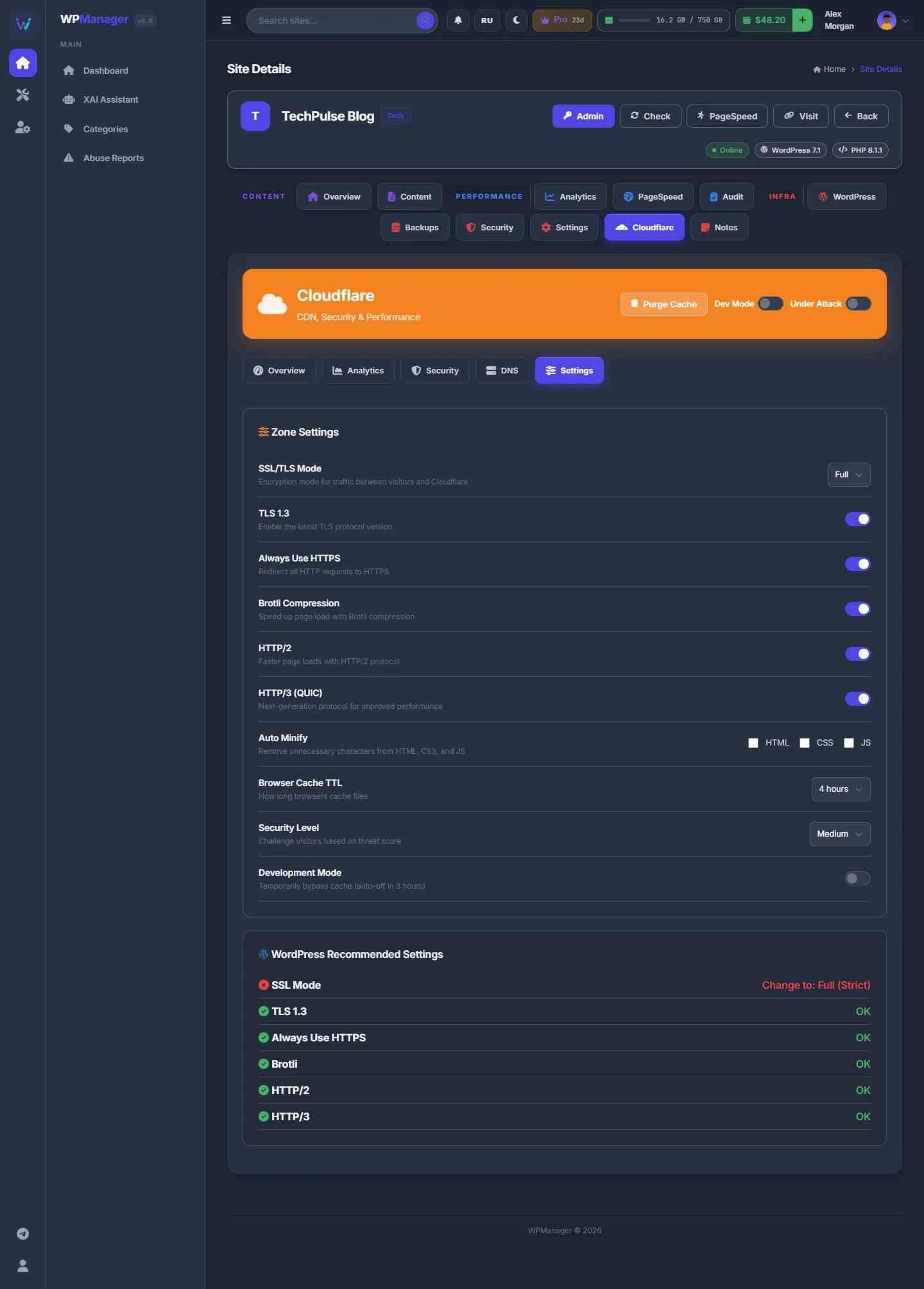
“Zone Settings” apply as soon as you change them:
| Setting | What it does |
|---|---|
| SSL/TLS Mode | How Cloudflare talks to your server: Off, Flexible, Full or Full (Strict). |
| TLS 1.3 | The newest, fastest TLS version for visitors. |
| Always Use HTTPS | Redirects every HTTP request to HTTPS. |
| Brotli Compression, HTTP/2, HTTP/3 (QUIC) | Faster delivery to browsers that support them. |
| Auto Minify | HTML, CSS and JS switches. Cloudflare retired Auto Minify in August 2024, so they no longer change anything: minify with a WordPress cache or optimisation plugin instead. |
| Browser Cache TTL | How long browsers keep files: Respect Origin, or from 30 minutes to 30 days. |
| Security Level | How suspicious a visitor must look to get a check page. |
| Development Mode | Bypasses the cache for a while; Cloudflare turns it off after 3 hours. |
The “WordPress Recommended Settings” card checks SSL Mode (Full (Strict)), TLS 1.3, Always Use HTTPS, Brotli, HTTP/2 and HTTP/3, and shows OK or “Change to: …” for each.
Visitor location for the Globe
The site’s Analytics tab has a Globe of visits. Its coordinates come from Cloudflare’s free “Add visitor location headers” transform. When Cloudflare is connected but the transform is off, the Globe offers “Enable visitor location headers”. It needs Managed Headers: Edit in the token; new visits get coordinates within minutes.
Costs
Free in the panel. Cloudflare’s own paid plans are billed by Cloudflare.
Troubleshooting
| What you see | What to do |
|---|---|
| “Failed to load Cloudflare data”, or a red row in “Check permissions” | The token lacks a permission or was revoked. Add the permission in Cloudflare, or connect again with a new token. |
| “Failed to purge cache” | The token needs Cache Purge — Purge. |
| A setting switch flips back with an error | Cloudflare refused the change: usually the token lacks Zone Settings — Edit, or the setting is not available on your Cloudflare plan. |
FAQ
Can I purge only one page?
The button purges the cache of the whole domain. Purge single URLs in Cloudflare itself.
Can I edit DNS records here?
No, the DNS sub-tab is read-only. Edit records in Cloudflare.
Why does Analytics show no threats older than a month?
Cloudflare keeps security events for 31 days, so the threat breakdown cannot go further back.