
Abuse reports (DMCA): review and resolve
The panel reads Google’s DMCA removal notices from your mailbox and finds which of your posts they name. For each report you decide what happens: change the post’s address, make the post private, move it to the trash or ignore the report — one at a time or many at once.
On this page
Where to find it: Links & files → Abuse Reports, or the bell icon “Abuse reports” in the top bar.
Before you start
- A mailbox that receives the notices is connected on the “Email Accounts” tab — see Mailboxes and automation for abuse reports.
- The sites named in the notices are added to the panel. Addresses on other domains are skipped.
- The WPManager plugin is installed on the site for the WordPress actions: Change URL, Set Private and Delete Post. See Installing and connecting the WPManager plugin.
- Enough USD balance for the paid actions (see Costs).
Fetch and review reports
-
Fetch new notices
Click “Check Emails” in the top-right corner. The dialog “Checking All Email Accounts” connects to every active mailbox and shows the number of messages, the subject being read and a log. At the end it shows the Accounts checked and the “New DMCA” count.
-
Get an overview
The cards at the top show Total Reports, New, Processed and Email Accounts. Below them, filter by mailbox (“Email” chips with new / total counts) and by site (“Site” chips). The status tabs — All, New (opens first), URL Changed, Hidden, Deleted, Ignored and Appealed — show their counts. “Search URL...” filters by the reported address.
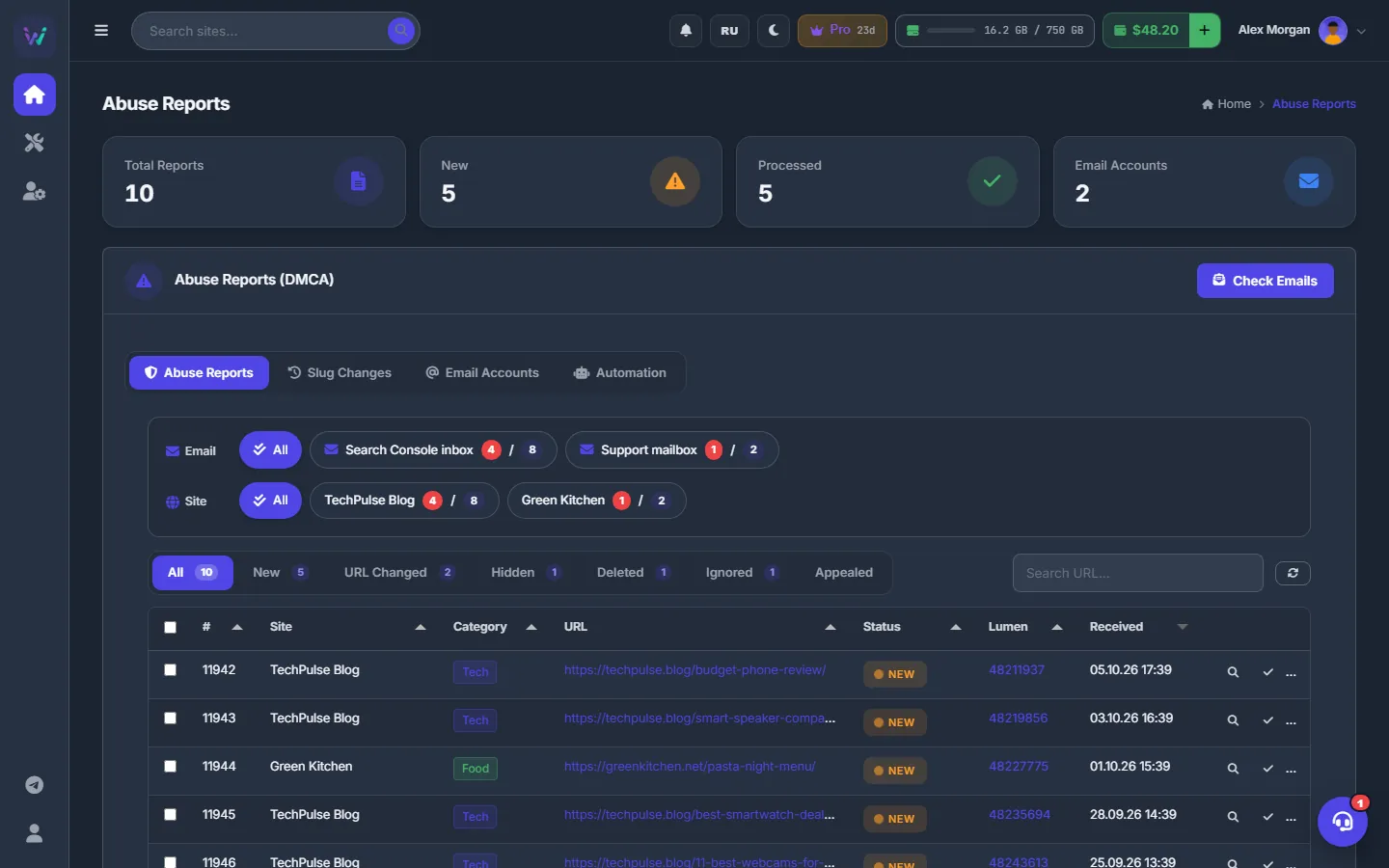
Fig. 1 All reports with filters by mailbox, site and status. -
Read a notice
The table shows #, Site, Category, URL, Status, Lumen (the notice number — click to copy) and Received. The magnifier “View” opens “DMCA Email - Abuse #N” with the sender, subject and date, the Reported URL, Lumen ID, Google Ref, a “View on Lumen” link and the Email Body.
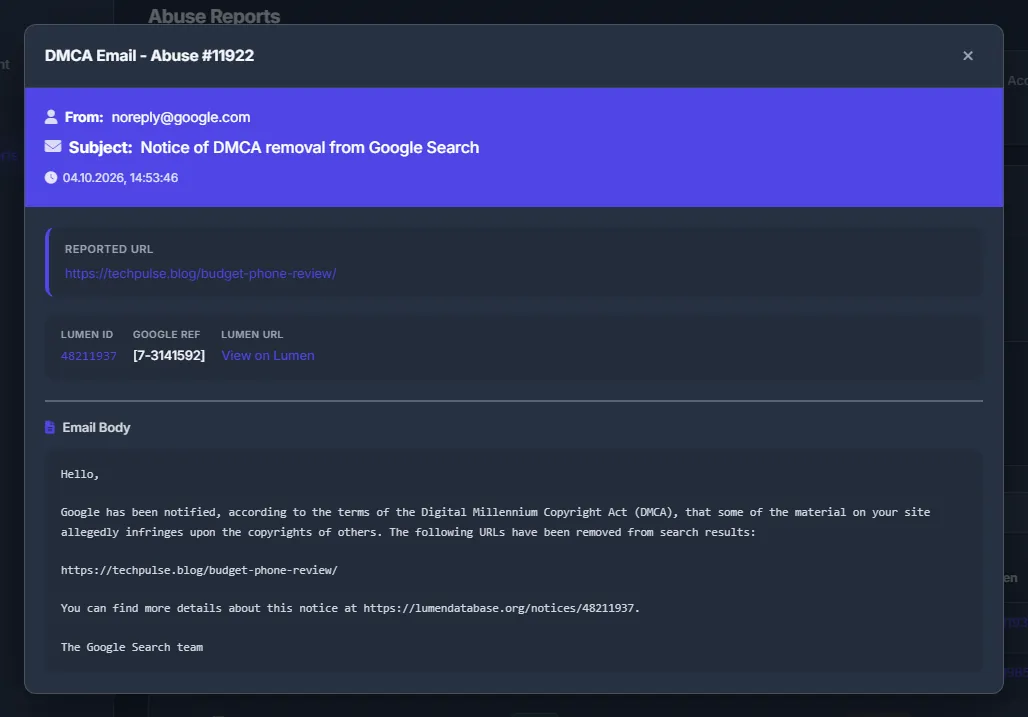
Fig. 2 The original Google notice behind a report, with a link to the published copy on Lumen.
Resolve a report
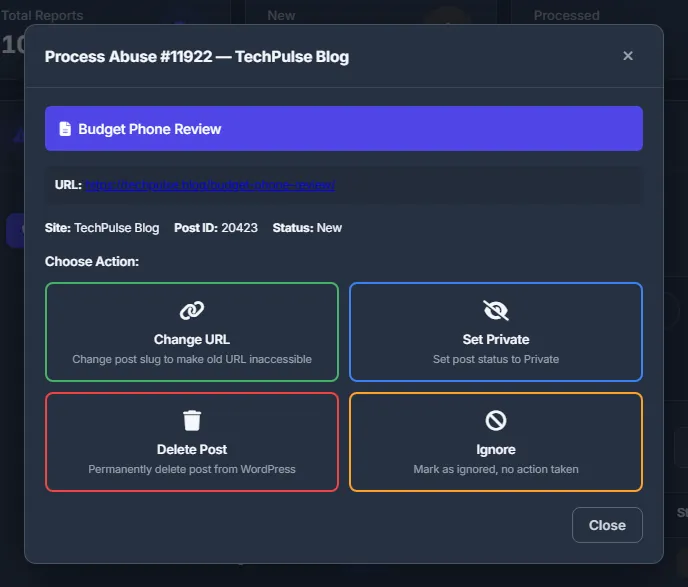
Click the check mark “Process” in the report’s row. The dialog shows the post title taken from the address, the URL, Site, Post ID and Status, and four actions:
| Action | What happens on the site |
|---|---|
| Change URL | The post’s slug gets a numeric suffix — _1, _2 and so on — so the reported address no longer opens the post. You can undo it on the “Slug Changes” tab. |
| Set Private | The post becomes private and disappears from the public site. |
| Delete Post | The post is moved to the WordPress trash. |
| Ignore | Nothing changes on the site; the report is marked as ignored. |
Confirm your choice. The result shows “Success!” with the new URL and slug, or “Failed” with the reason.
Resolve many reports at once
-
Select the reports
Tick the rows; the checkbox in the header ticks the whole page. A bar “N selected” appears with Change Slug, Set Private, Delete Post, Ignore, Mark Processed and Delete Report.
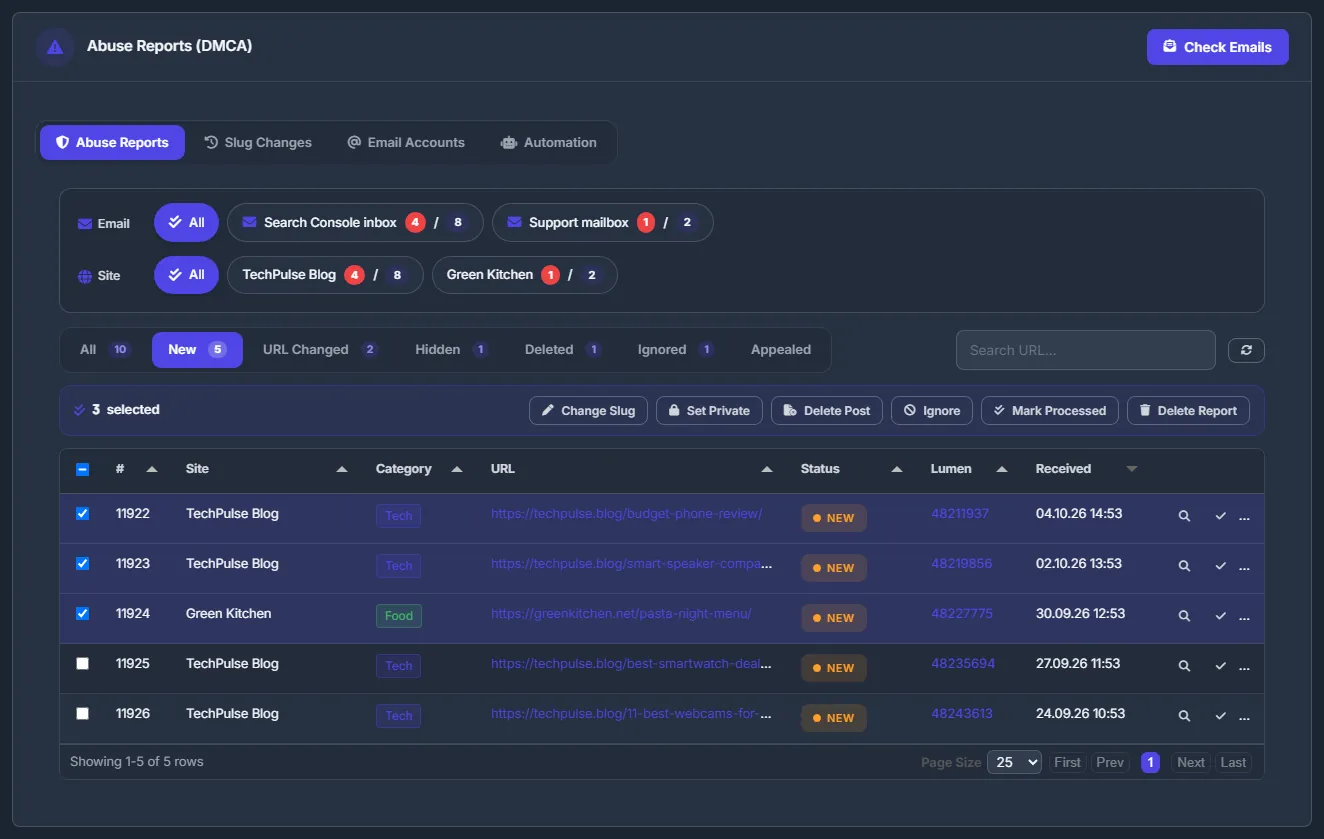
Fig. 4 Three new reports ticked; the bulk bar is above the table. -
Run the action
For the WordPress actions the panel first warns about sites without the plugin (“Plugin not installed on: … These abuses will be skipped …”). Then it shows a live log with ✅ or ❌ for each address and the result “N OK / M failed of K total”.
Undo a slug change
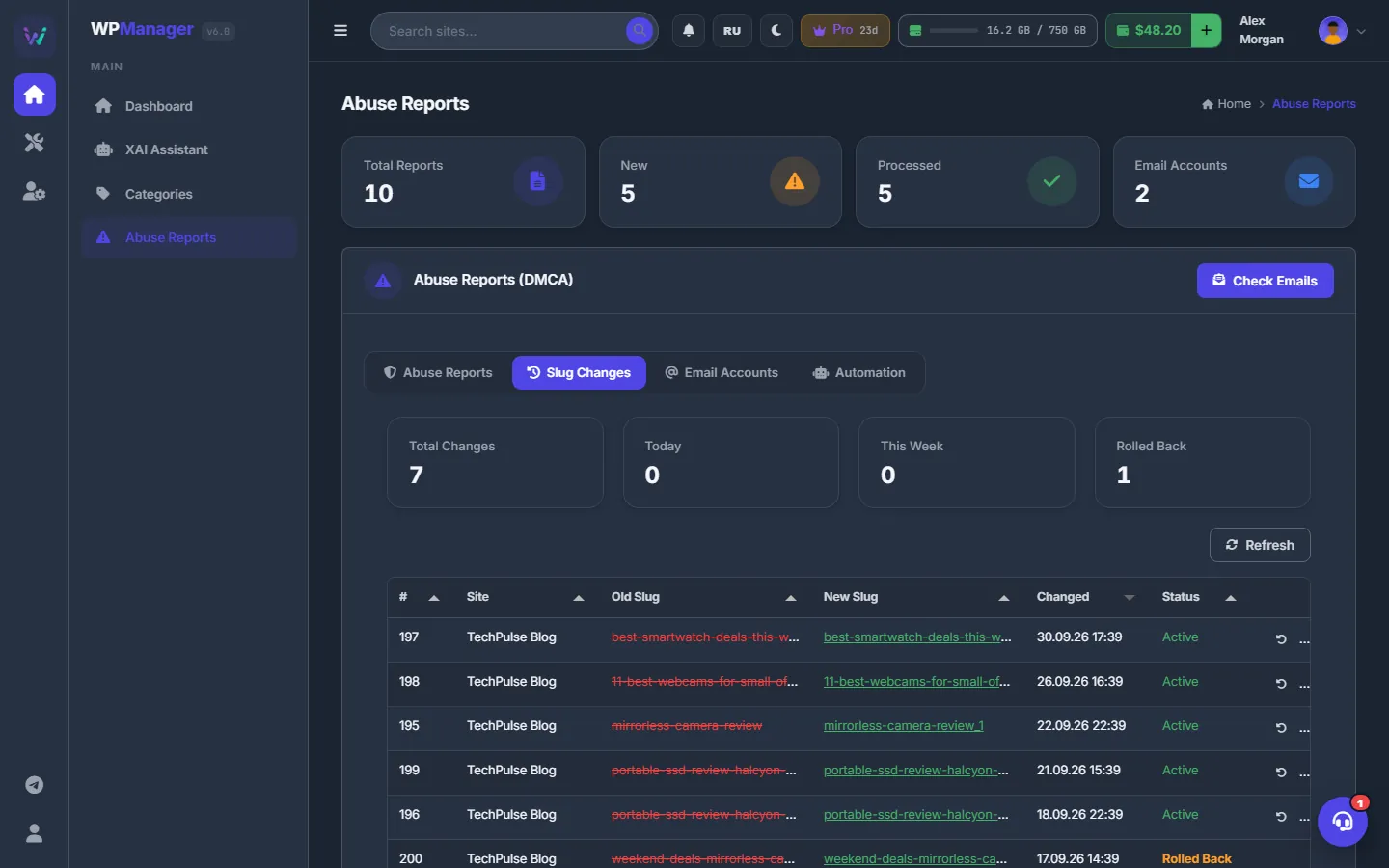
Open the “Slug Changes” tab. At the top you see Total Changes, Today, This Week and Rolled Back; below, a table with #, Site, Old Slug (struck through), New Slug, Changed and Status (Active or Rolled Back). Click “Rollback” and then “Confirm Rollback” to give the post its old slug back.
What counts as an abuse report
A message counts as a DMCA notice when it comes from Google (noreply@google.com, copyright@google.com), has “DMCA”, “copyright” or “legal removal” in the subject, or mentions lumendatabase.org or “DMCA complaint” in the text.
- Every address in the notice that belongs to one of your sites becomes a report attached to that site.
- Pagination addresses (
/page/…) and addresses on other domains are skipped. - A report that is already in the list is not added again.
- A report about a subdomain of your site is kept but has no site attached, so WordPress actions are not available for it.
Statuses
| Status | Meaning |
|---|---|
| New | Not handled yet. |
| URL Changed | The slug was changed — or you used “Mark Processed” for a post you had already fixed yourself. |
| Hidden | The post was made private. |
| Deleted | The post was moved to the trash. |
| Ignored | No action was taken. |
| Appealed | The report is marked as appealed. |
Costs
Each successful WordPress action — Change URL / Change Slug, Set Private and Delete Post — is charged from your USD balance. Ignore, Mark Processed, Delete Report and Rollback are free.
- Each successful action costs $0.10.
- Before running, the panel checks that your balance covers all selected actions (“Insufficient balance. Need $X, have $Y”).
- Only actions that succeeded are charged.
See also What you pay for and USD balance and top-up.
Troubleshooting
| What you see | What to do |
|---|---|
| “WPManager plugin not installed on <site>. Please install the plugin first.” | Install and connect the WPManager plugin on that site, then run the action again. |
| “Site not assigned to this abuse” | The address is on a subdomain or a domain that is not one of your sites. Handle the post on that site directly, or add the site to the panel. |
| “Could not extract slug from URL” | The address points to a home page or an archive, not a post. Handle it in WordPress and click “Mark Processed”. |
| “Insufficient balance. Need $X, have $Y” | Top up your balance or select fewer reports. |
FAQ
Where do these emails come from?
Google sends them to the site owner when it removes addresses from search after a DMCA complaint; the notice is also published on Lumen. The panel only reads them from your mailbox.
Does deleting a report change my site?
No. “Delete Report” only removes the record from the panel.
Which action should I choose?
“Change URL” keeps the post on the site under a new address and can be rolled back in one click. “Set Private” hides the post completely. “Delete Post” moves it to the WordPress trash.