
Glossary
Short explanations of the words used throughout this guide — from plugin and API key to conveyor, run and balance. Each term links to the page that covers it in detail.
On this page
- Sites and WordPress
- Site
- Plugin (WPManager API)
- API key
- Files and file hosts
- File host
- Premium
- Dead link
- Link transfer
- Files and storage quota
- Downloads
- Task
- Automation and AI
- Conveyor
- Plan (conveyor)
- Step
- Run
- XAI Assistant (AI agent)
- Money and plans
- Balance
- Top-up
- Credits
- Plan (subscription)
- AI bonus
- Referral
- Stores
- Store
- Invoice
- Content store
- Order desk
- Promo code
- Exclusive
- Help and alerts
- Support chat
- Telegram alerts
- Related
Sites and WordPress
Site
A WordPress site you added to the panel on the Dashboard with “Add New Site”: name, URL, category, description and, optionally, the plugin’s API key. Your plan limits how many sites can be active at the same time. See Adding, editing and removing sites.
Plugin (WPManager API)
The small WordPress plugin that lets the panel work with your site: read and edit posts, run scans, make backups and more. Download it from the “Add New Site” window (“Download plugin”) and install it like any other plugin. It needs WordPress 5.6+ and PHP 7.4+. Its settings are in the WordPress admin under Settings → WPManager API. See Installing and connecting the WPManager plugin.
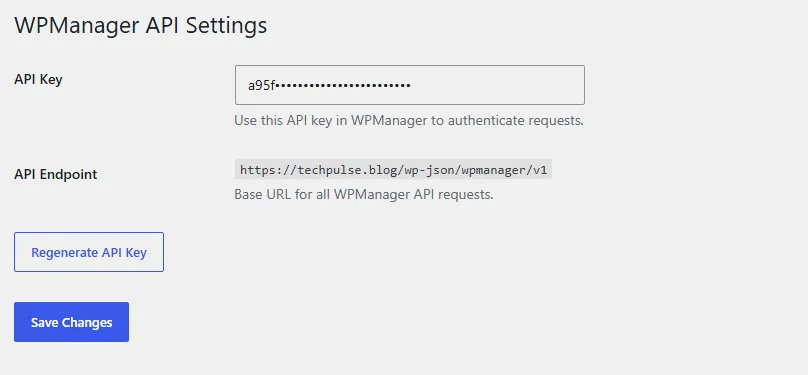
API key
A secret string that proves a request comes from someone allowed to make it. In WPManager it usually means the plugin’s key: you copy it from Settings → WPManager API on your site and paste it into the site’s settings in the panel; requests without the right key are refused. “Regenerate API Key” on that WordPress page makes a new key — paste the new one into the panel afterwards. File hosts and other services have API keys of their own, which you enter on their pages in the panel.
Files and file hosts
File host
A service that stores files and gives out download links — Keep2Share, Rapidgator, sites built on XFileSharing and others. The panel uploads to file hosts, checks their links and can move files from one host to another. See File host accounts.
Premium
A paid account on a file host that downloads without waiting and at full speed. The panel downloads through your own key or premium login when you have one; otherwise it uses WPManager’s shared premium, paid per GB from your balance (a plan may include some GB). See Premium accounts and premium download prices.
Dead link
A link in your posts to a file that no longer works on its file host. “Find Dead Links” lists them for each site and shows which ones can be restored from backups. See Find Dead Links and restore the files.
Link transfer
Moving files from one file host to another and swapping their links on your sites (Links & files → Transfer & replace). See Transfer files between file hosts.
Files and storage quota
Files is your own storage in WPManager: a file manager with uploads, archives, image and video tools and uploads to file hosts. The quota is how much it may hold; the top bar shows used / total. New uploads and copies need free room within the quota. See Files: your storage in the panel.
Downloads
The panel’s download manager. It fetches links — premium file hosts included — and torrents straight into your Files, in several connections, on the server. See Downloads: links, file hosts and the queue.
Task
A background job on your storage: an upload, an archive, a conversion, screenshots, an upload to a file host, a copy from the Content store. The Tasks page shows each one with its progress, and tasks keep running after you close the page. See Storage tasks.
Automation and AI
Conveyor
Automation for releases: a plan of steps that a file (or a link) goes through on the server — download, unpack, screenlist, video studio, archive, upload to file hosts, AI text, post to your site, move. Plans are started from Files, Downloads or the Conveyor page. See Conveyor: build a plan.
Plan (conveyor)
A saved chain of conveyor steps. A plan starts either from files or from links; only plans that start from files can take a bought video from the Content store.
Step
One action inside a conveyor plan, for example “upload to a file host” or “write the post with AI”. Steps run in order, and a failed run can be retried from the step that failed. See Conveyor: all steps and their settings.
Run
One pass of a plan over the chosen files or links. Runs keep going in the background on the server and are listed under Conveyor → “Runs” with the step they are on; they can be cancelled or retried. See Conveyor: start plans and follow runs.
XAI Assistant (AI agent)
The AI chat of the panel. Besides answering questions about WordPress, SEO and content, it can act on your sites and files when you ask it to. Its work is paid from your balance by the tokens it uses. See XAI Assistant: AI chat and the WPManager Agent.
Money and plans
Balance
Your money in the panel, in US dollars. One balance pays for everything: plans and their add-ons, AI, traffic beyond the plan's allowance, torrents, premium downloads, video conversion, Store products, invoices and Content store videos. The balance is shown in the top bar, and every movement is listed on the Profile page under “Transactions”. See What you pay for.

Top-up
Adding money to the balance with crypto: USDT on the TRC20 network (1 USDT = $1; the window gives you the exact amount and the wallet address) or, when the top-up window offers it, BTC, ETH, TON, SOL and 300+ other coins through a NOWPayments payment page. The money is credited automatically once the network confirms the payment. The minimum is $10. See USD balance and top-up.
Credits
There is no separate credit currency — everything is in dollars on the balance. In the Profile charts, “Credits” and “Admin credits” are simply money added to your balance other than by a top-up: by the team, or as a bonus. See Profile: billing dashboard and account settings.
Plan (subscription)
What your account gets for a period: how many active sites, how much storage and monthly traffic, which features, an AI bonus and included premium GB or conversion minutes. Plans are bought and renewed from the balance on “Plans & Pricing”, where auto-renewal can also be switched off and extra storage or extra sites added. A new account starts with a 30-day free trial instead of a plan; when it ends unpaid, the account is on hold until a plan is bought. See Plans & Pricing.
AI bonus
Money that some plans add to your balance when you buy them: the monthly amount, ×12 for a yearly purchase, but never more than the price paid. Once added, it is ordinary balance money.
Referral
Someone who signed up through your referral link (Account → Referrals). For life, you get a share of what they spend from their balance — the percent is shown on the Referrals page — credited to your balance every hour. By default, Store, invoice and Content store purchases do not count. See Referral program.
Stores
Store
Themes, engines and plugins that the WPManager team installs on your site for a one-time price from your balance; extra work is billed by invoice. See Store: themes, engines and plugins.
Invoice
A bill from the team for custom work, for example migrating a site. You pay it from the balance on the Store page, in the “Invoices” block. See Store orders and invoices.
Content store
A catalogue of videos you buy from the balance, with previews. Bought videos can be downloaded, copied into Files or sent to the conveyor. See Content store: the catalogue.
Order desk
The “Orders” tab of the Content store: you send links to videos, the team fetches them and sets one price, you check the samples and pay. See Ordering videos by links (the order desk).
Promo code
A code that gives a discount in the Content store cart — a percentage or a fixed amount. See Promo codes.
Exclusive
A Content store video sold to one buyer only; after the purchase it leaves the store.
Help and alerts
Support chat
The round headset button at the bottom right of every page. The team answers in the panel and, if Telegram alerts are connected, you also get a “Support replied” message in Telegram. See Support chat.
Telegram alerts
Messages from the panel’s Telegram bot about your account: a site going down and coming back, SSL and domain expiry, balance and plan events, WordPress update results, Finance reminders, Store orders and invoices, Content store orders and support replies. Connect them under Account → Telegram alerts. See Telegram alerts.